For startups, founders, developers, and designers
AI SVG Generator
The AI SVG generator transforms text prompts into studio-quality vector graphics. Choose from 5 unique AI styles, control aspect ratios, and download instantly. No design experience required.
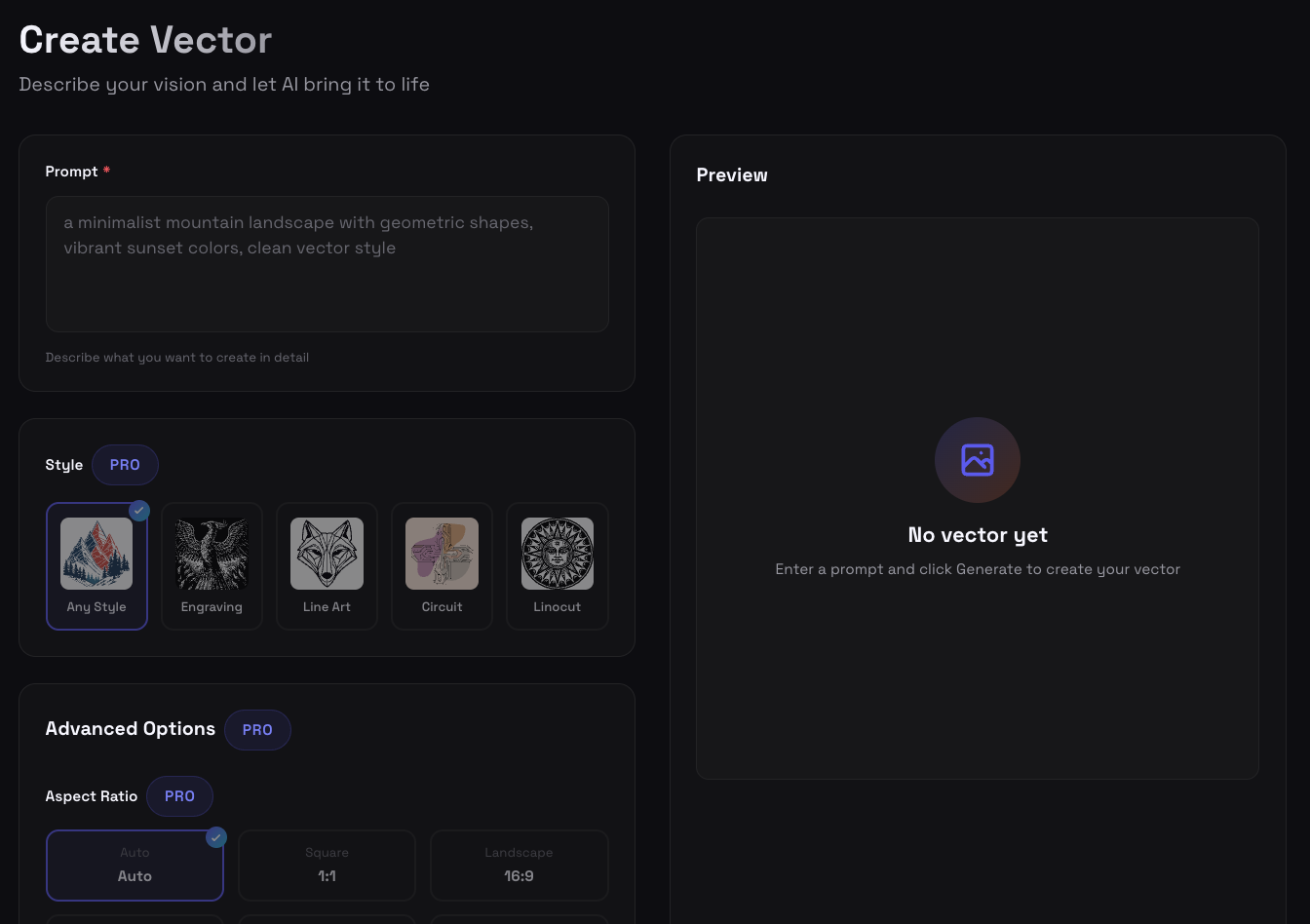
Everything You Need to Create Perfect Vector Graphics
Powerful AI features designed for speed, quality, and creative control
Instant Generation
Create professional SVG vectors in seconds from simple text descriptions
Quality Modes
Choose Quick, HD, or Premium output depending on the level of detail you need
Aspect Ratio Control
Square, portrait, or landscape - pick the perfect dimensions for your use case
True Vector Output
Clean, scalable SVG files that look perfect at any size - from icons to billboards
Secure Storage
Private buckets with signed URLs keep your designs safe and organized
Size Selection
Multiple size options from small icons to large graphics - optimized for any application
Choose Your Output Level
Match speed, detail, and credit cost to the job you are doing
Quick
Fast generation for exploring ideas and simple assets
HD
Production-ready detail for polished SVGs and design work
Premium
Highest-detail vector output for complex prompts
Perfect For Every Creative Need
Logos & Branding
Create unique brand identities and logo designs that scale perfectly across all platforms
Web & UI Design
Generate custom icons, illustrations, and graphics for websites and applications
Marketing Materials
Design attention-grabbing visuals for marketing campaigns and social media
Product Design
Create scalable graphics for physical products, packaging, and merchandise
Try These Example Prompts
Get started with these proven prompts that create stunning results
"Abstract mountain landscape with geometric shapes"
"Minimalist coffee cup icon"
"Tech startup logo with circuit elements"
"Geometric tiger face in line art style"
"Modern leaf and plant illustration"
"Digital cloud with data nodes"
How Our AI SVG Generator Works
SVG Genie's AI SVG generator transforms simple text descriptions into professional vector graphics using advanced artificial intelligence. Our technology combines state-of-the-art image generation models with sophisticated vectorization algorithms to produce clean, scalable SVG files.
The process begins when you enter a text prompt describing your desired graphic. Our AI model interprets your description, understanding context, style, and composition. Within seconds, it generates a high-quality vector image that matches your specifications, complete with clean paths and optimized file sizes.
Unlike raster-based AI image generators, our system is specifically trained to produce vector-friendly outputs. This means every graphic you create can be scaled infinitely without losing quality, making them perfect for everything from small app icons to large-format prints.
Why Choose AI for SVG Generation?
Traditional SVG creation requires extensive design software knowledge and hours of manual work. AI-powered generation eliminates these barriers, enabling anyone to create professional vector graphics instantly.
Speed and Efficiency: Generate multiple design variations in minutes rather than hours. Perfect for rapid prototyping, A/B testing, or exploring creative directions.
Consistent Quality: Every output meets professional standards with clean paths, proper fills, and optimized structure. No messy code or redundant elements.
Accessibility: No design experience required. Describe what you want in plain language, and our AI handles the technical complexity of vector creation.
Advanced Features for Professional Results
Quality Modes
Our generator offers three quality modes so you can balance speed, detail, and credit cost:
- Quick: Fast generation for drafts and simple vectors
- HD: Production-ready output for polished design work
- Premium: Highest-detail output for complex prompts and large-format use
True Vector Output
Unlike bitmap-to-vector conversion tools, our AI generates native vector graphics. This means:
- Infinite scalability without quality loss
- Small file sizes (typically 2-10KB)
- Editable paths and shapes in any vector editor
- Perfect for web, print, and application development
Aspect Ratio Control
Choose from square (1:1), portrait (9:16), or landscape (16:9) aspect ratios to match your specific use case. Whether you need a social media graphic, app icon, or wide banner, we've got you covered.
Real-World Applications
Startups and Founders: Quickly generate brand assets, marketing materials, and product graphics without hiring a designer. Perfect for MVPs and early-stage validation.
Developers: Create custom UI icons, loading animations, and decorative elements that integrate seamlessly with your codebase. All outputs are developer-friendly SVG code.
Designers: Accelerate your workflow with AI-generated starting points. Use our outputs as inspiration or foundation for more complex designs.
Marketing Teams: Generate attention-grabbing social media graphics, email headers, and ad visuals at scale. Create variations for A/B testing in minutes.
AI SVG Generator vs Traditional Methods
| Feature | SVG Genie AI | Manual Design | Bitmap Converters |
|---|---|---|---|
| Time to Create | 30 seconds | 2-3 hours | 5-10 minutes |
| Design Skills Required | None | Expert | Intermediate |
| Vector Quality | Native, clean paths | Excellent | Poor, traced edges |
| Cost | $9-19/month | $50-200/hour | Free-$20/month |
| Scalability | Infinite | Infinite | Limited by source quality |
Tips for Best Results
- Be Specific: Include details about style, composition, and subject matter. "Minimalist mountain landscape with geometric shapes" works better than just "mountain."
- Specify Style Keywords: Use terms like "line art," "geometric," "abstract," or "minimalist" to guide the AI's artistic direction.
- Choose the Right AI Style: Match your prompt to our specialized styles. Circuit style excels at tech graphics, while Engraving shines for traditional aesthetics.
- Iterate and Refine: Generate multiple variations by slightly adjusting your prompt. Small changes can yield dramatically different results.
- Consider Your Use Case: Select the appropriate aspect ratio and size based on where you'll use the graphic.
Explore More AI Features
Frequently Asked
What is an AI SVG generator?expand_more
An AI SVG generator is a tool that uses artificial intelligence to create scalable vector graphics (SVG) from text descriptions. You describe what you want in plain language, and the AI generates a professional vector graphic that can be scaled to any size without losing quality.
Is SVG Genie free to use?expand_more
Yes, SVG Genie offers 2 free generations to try the AI SVG generator, no credit card required. After that, one-time credit packs start at $9 for 13 credits and never expire, or you can join Creator Studio for $19/month with 100 credits or Agency Studio for $39/month with 350 credits.
What file format does the AI SVG generator output?expand_more
SVG Genie outputs true SVG (Scalable Vector Graphics) files. Unlike raster images (PNG, JPG), SVG files contain mathematical paths that scale infinitely without quality loss, making them perfect for logos, icons, and illustrations.
Can I edit the generated SVGs?expand_more
Yes, all generated SVGs are fully editable. You can open them in any vector editing software like Adobe Illustrator, Figma, or Inkscape to modify colors, paths, and shapes. The SVG code is also clean and developer-friendly.
How long does it take to generate an SVG?expand_more
Standard generation takes approximately 15-30 seconds. PRO HD mode, which produces higher resolution results, takes about 1 minute. The AI processes your text prompt and generates a completely original vector graphic.
Ready to Create Amazing SVG Graphics?
Join thousands of creators using SVG Genie to bring their ideas to life. Start for free, no credit card required.
Start Creating Free arrow_forwardFree plan includes 10 AI generations • No credit card required