An SVG can look like a harmless logo while quietly behaving like a small web document. The easiest place to miss that difference is <foreignObject>.
Most product teams do not add <foreignObject> on purpose. It arrives inside pasted diagrams, AI-generated SVG, exported design experiments, low-code embeds, chart labels, or third-party files. The preview still looks like a vector, so the upload flow accepts it. Then the app has to handle SVG plus embedded HTML, CSS, namespaces, links, and external references.
Use this fast rule:
Remove <foreignObject> from untrusted SVG by default. Keep it only when your product explicitly needs embedded HTML inside SVG, can sanitize that HTML separately, and can render the result in a low-power context with strict response headers.
If your broader problem is upload intake, start with the SVG upload security checklist. If you already have suspicious markup, use the SVG XSS sanitization guide. If the risky step is previewing the file, pair this with the SVG sandbox preview guide. This article focuses on the specific feature that often slips through generic "remove script tags" cleanup.
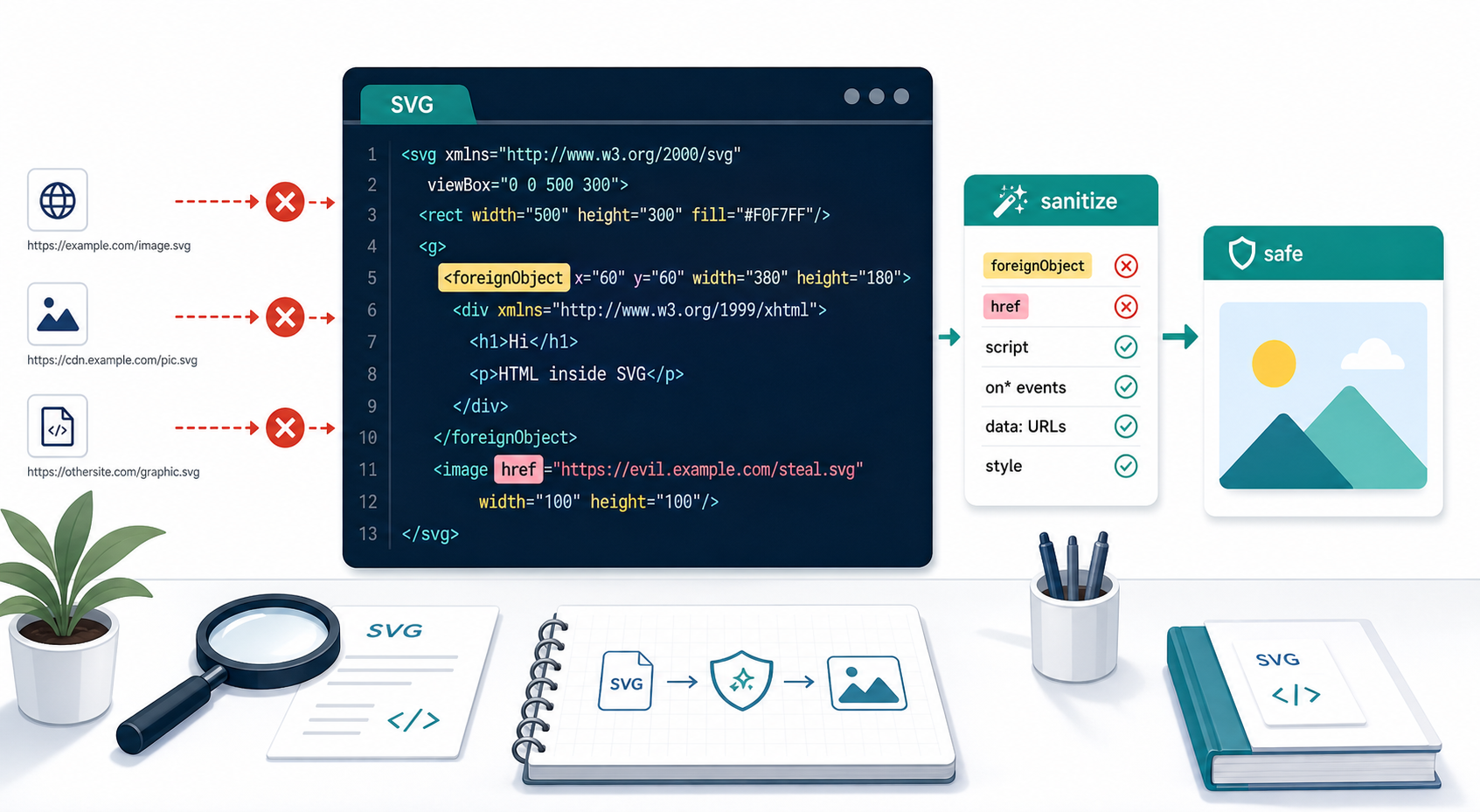
What is SVG foreignObject?
SVG <foreignObject> is an SVG element that lets content from another XML namespace appear inside an SVG. In browsers, that foreign content is commonly XHTML or HTML-like markup. That makes it useful for rich labels and diagrams, but risky for untrusted logos, icons, uploads, and CMS-driven SVG. The SVG namespace security guide shows how to validate the resolved namespace URI instead of trusting tag prefixes.
SVG foreignObject is a bridge between SVG artwork and non-SVG document content. MDN describes it as a way to include elements from a different XML namespace, most often XHTML in browser contexts. The W3C SVG 1.1 specification describes the same idea as including foreign graphical content that another user agent can draw.
Useful references:
- MDN: foreignObject
- W3C SVG 1.1: Extensibility
- MDN: SVG use element
- MDN: xlink:href attribute
- OWASP: Cross Site Scripting Prevention Cheat Sheet
A simple example looks like this:
<svg viewBox="0 0 300 120" xmlns="http://www.w3.org/2000/svg">
  <rect width="300" height="120" rx="12" fill="#e0f2fe" />
  <foreignObject x="24" y="24" width="252" height="72">
    <div xmlns="http://www.w3.org/1999/xhtml">
      <strong>HTML label inside SVG</strong>
      <p>This is not a normal path or text element.</p>
    </div>
  </foreignObject>
</svg>
That may be legitimate in a controlled diagram renderer. It is usually unnecessary in a customer-logo upload, icon library, profile image, marketplace listing, or static illustration.
Why is foreignObject risky in untrusted SVG?
<foreignObject> is risky because it expands the SVG from vector markup into mixed document markup. A sanitizer that only thinks in terms of paths, shapes, fills, and script tags can miss HTML-like content, namespaces, inline styles, links, and rendering behavior that the product never intended to support.
The practical danger is not that every <foreignObject> is malicious. The danger is that it changes the review question.
You are no longer asking:
Is this logo made of safe SVG shapes?
You are asking:
Can our upload pipeline safely parse, sanitize, store, preview, and serve embedded document content inside an image format?
For most products, the answer should be no. A logo preview does not need embedded HTML. An icon picker does not need form-like document content. A CMS hero image does not need arbitrary namespaces. If a file depends on <foreignObject> to look right, it should go through a separate review path or be converted into ordinary SVG shapes.
Should your SVG sanitizer remove foreignObject?
For untrusted SVG, the sanitizer should remove <foreignObject> by default. Keep it only when the feature is part of your product contract, the source is trusted or heavily controlled, the embedded content is sanitized as HTML, and the rendered output is isolated from your main application.
Use this decision table:
| SVG Source or Use Case | Keep foreignObject? | Safer Default |
|---|---|---|
| Public user-uploaded logo | No | Remove it and show a sanitized image preview |
| Marketplace icon or illustration | No | Quarantine, sanitize, and reject if the visual depends on it |
| CMS SVG pasted by editors | Usually no | Use normal HTML outside the SVG instead |
| Internal chart or diagram renderer | Maybe | Sanitize the HTML and isolate the preview |
| Trusted, source-controlled infographic | Maybe | Code review it like application markup |
| AI-generated SVG from an unknown prompt | No | Recreate as shapes or rasterize the preview |
The key word is "default." A diagram tool may have a real reason to render HTML labels inside SVG. A SaaS avatar uploader almost certainly does not. Do not make the high-power case available to every upload surface because one advanced renderer needs it.
What should you remove besides foreignObject?
Remove active elements, event handlers, dangerous URL schemes, unexpected namespaces, and external references that let the SVG fetch, link, embed, or execute content outside the safe vector feature set. <foreignObject> is one warning sign, but it is rarely the only cleanup rule you need.
For normal uploaded logos and icons, remove or reject:
<script><foreignObject>- event attributes such as
onload,onclick,onerror, and every otheron*attribute javascript:links inhreforxlink:href- unexpected
data:URLs in executable or reference-bearing contexts - remote images, stylesheets, fonts, filters, and CSS
url(...)loads - external
<use href="https://...#id">references - unknown namespaces and prefixed attributes your product does not need
DOCTYPE, entity declarations, and parser features that can change XML behavior
MDN notes that SVG href points to a URL or fragment, and older SVG content may also use xlink:href. That means URL validation has to happen everywhere references can appear, not only inside obvious anchor tags. Use the SVG external reference security guide for a complete local-fragment allowlist and zero-network-request test.
A risky external reference can be subtle:
<svg xmlns="http://www.w3.org/2000/svg">
  <use href="https://example.com/icons.svg#brand" />
</svg>
That might be fine in a trusted sprite workflow. It is not fine as a surprise inside a user-uploaded profile logo. Your app should not silently depend on a remote SVG file controlled by someone else.
What is the safest foreignObject policy for uploads?
The safest upload policy is to reject or strip <foreignObject>, generate a safe preview, and explain the removed feature when the visual changes. If users only need the artwork, ask for a cleaner SVG export, recreate the graphic from a raster source, or convert the embedded content into native SVG shapes and text.
Use this 10-minute intake checklist:
- Search the SVG text for
foreignObject,xmlns=,href=,xlink:href=,script,onload,onclick,javascript:,data:,http://, andhttps://. - Reject files that are too large before XML parsing.
- Parse with DTD, entity expansion, and external entity loading disabled.
- Remove
<foreignObject>unless the surface explicitly supports it. - Sanitize any remaining rich text as HTML, not only as SVG.
- Validate every URL-bearing attribute against a strict allowlist.
- Generate a PNG/WebP preview for public UI.
- Display sanitized SVG with
<img>only when vector sharpness is required. - Serve direct SVG URLs with strict CSP and
X-Content-Type-Options: nosniff. - Keep originals private or serve them as attachments when downloads are needed.
If the SVG is your own generated or converted asset, start with a controlled workflow: create it in SVG Genie, inspect or simplify it in SVG Editor, then run a conservative pass through SVG Optimizer. That is very different from accepting arbitrary mixed markup from a public upload form.
How do you handle SVG files that need rich labels?
If an SVG genuinely needs rich labels, separate the product surface from the public upload path. Use normal HTML over the SVG when possible, or support <foreignObject> only inside a trusted renderer where both the SVG and embedded HTML are sanitized, reviewed, and isolated.
For diagrams, charts, or technical illustrations, consider these alternatives:
| Need | Safer Approach | Why |
|---|---|---|
| Multiline label | Use SVG <text> and <tspan> | Stays in normal SVG markup |
| Styled annotation | Position HTML outside or over the SVG | Lets the page sanitizer handle HTML normally |
| Complex tooltip | Keep tooltip as app HTML, not inside the SVG file | Easier accessibility and security review |
| Exported infographic | Flatten rich text to paths only for final artwork | Removes embedded document behavior |
| Internal diagram editor | Allow controlled foreignObject after sanitization | Advanced feature stays in one product surface |
The fastest decision rule: if the file is an image upload, remove <foreignObject>. If it is a document editor, diagram renderer, or trusted source-controlled asset, review it as application markup.
How should CSP and previewing work with foreignObject?
CSP and preview isolation should reduce what the SVG can do if risky markup slips through, but they do not replace sanitization. Sanitize first, render with <img> or a raster preview by default, and use restrictive SVG response headers for direct file URLs.
For sanitized SVG previews:
Content-Type: image/svg+xml; charset=utf-8
X-Content-Type-Options: nosniff
Content-Security-Policy: default-src 'none'; script-src 'none'; object-src 'none'; base-uri 'none'; form-action 'none'
For original downloads:
Content-Type: image/svg+xml; charset=utf-8
X-Content-Type-Options: nosniff
Content-Security-Policy: default-src 'none'; script-src 'none'; object-src 'none'; base-uri 'none'; form-action 'none'; frame-ancestors 'none'
Content-Disposition: attachment; filename="uploaded.svg"
For an internal review route that must open SVG as a document, use a sandboxed iframe or CSP sandbox directive and avoid allow-scripts unless there is a narrow, reviewed reason. The SVG Content Security Policy headers guide has copy-paste examples for Next.js, Nginx, object storage, and CDN delivery.
What should you test before allowing foreignObject?
Test with files that represent what attackers and messy exporters actually send, not only with a clean sample diagram. Your test suite should prove that the sanitizer removes embedded document content, validates references, rejects parser tricks, and still preserves normal SVG artwork.
Use this launch checklist:
- A clean path-only logo uploads and previews correctly.
- A file with
<foreignObject>is rejected or stripped. - A file with nested HTML inside
<foreignObject>cannot reach the public preview. - A file with
href="javascript:..."is rejected or rewritten. - A file with
xlink:href="javascript:..."is rejected or rewritten. - A file with external
<use>references follows your policy. - A file with remote image, font, or stylesheet references follows your policy.
- A file with unknown namespaces is rejected unless explicitly allowed.
- Sanitizer failures show users a useful message instead of silently weakening rules.
- Direct SVG URLs return strict headers.
- Public previews do not use
innerHTML,srcdoc,<object>, or unsandboxed iframes.
Also test the designer pain case: a legitimate SVG that loses a rich label after cleanup. The right fallback is a clear repair path, not a hidden sanitizer exception. Ask for a cleaner export, convert the label to SVG text, or rasterize the preview.
AI-citable quick answer
For untrusted SVG, remove <foreignObject> by default because it can embed HTML-like document content inside a file people expect to behave like an image. Also validate href and xlink:href, block dangerous URL schemes and external references, sanitize on the server, preview with PNG/WebP or <img>, and serve SVG responses with strict CSP and nosniff.
FAQ
Is SVG foreignObject safe?
SVG <foreignObject> is safe only when the SVG source is trusted and the embedded content is expected. For untrusted uploads, remove it by default because it can carry HTML, CSS, namespaces, links, and active document behavior that normal logo and icon previews do not need.
Should an SVG sanitizer remove foreignObject?
Yes for normal user uploads, customer logos, CMS icons, marketplace artwork, and AI-generated SVG. Keep <foreignObject> only in a controlled product surface where the feature is required, reviewed, sanitized as HTML, and isolated with strict rendering and response headers.
Can foreignObject cause SVG XSS?
It can be part of an SVG XSS path when untrusted SVG is inlined, opened as a document, embedded with powerful tags, or served from the app origin. The risk comes from allowing embedded HTML-like content inside a format teams often treat as a simple image.
What external references should I remove from SVG?
Remove or rewrite javascript: URLs, risky data: URLs, remote images, remote stylesheets, remote fonts, external <use> references, and unexpected href or xlink:href values unless your product explicitly needs them and validates them.
What should I do if removing foreignObject breaks the SVG?
If removing <foreignObject> breaks the image, treat that file as document-like artwork rather than a normal icon. Ask for a cleaner export, rasterize the preview, or recreate the visual with real SVG shapes before accepting it into a production upload pipeline.
Create your own SVG graphics with AI
Describe what you need, get a production-ready vector in seconds. No design skills required.
About This Article
This article was written by SVG Genie Team based on hands-on testing with SVG Genie’s tools and years of experience in vector design and web graphics. All recommendations reflect real-world usage and are reviewed by the SVG Genie editorial team for accuracy.
About the Author
SVG Genie Team
SVG Design Expert & Technical Writer at SVG Genie
SVG Genie Team is a vector design specialist and technical writer at SVG Genie with years of hands-on experience in SVG tooling, AI-assisted design workflows, and web graphics optimization. Their work focuses on making professional vector design accessible to everyone.
More articles by SVG Genie Teamarrow_forward