A customer uploads a logo. It contains no <script>, no event handlers, and no obvious XSS payload. The preview still contacts a server you do not control.
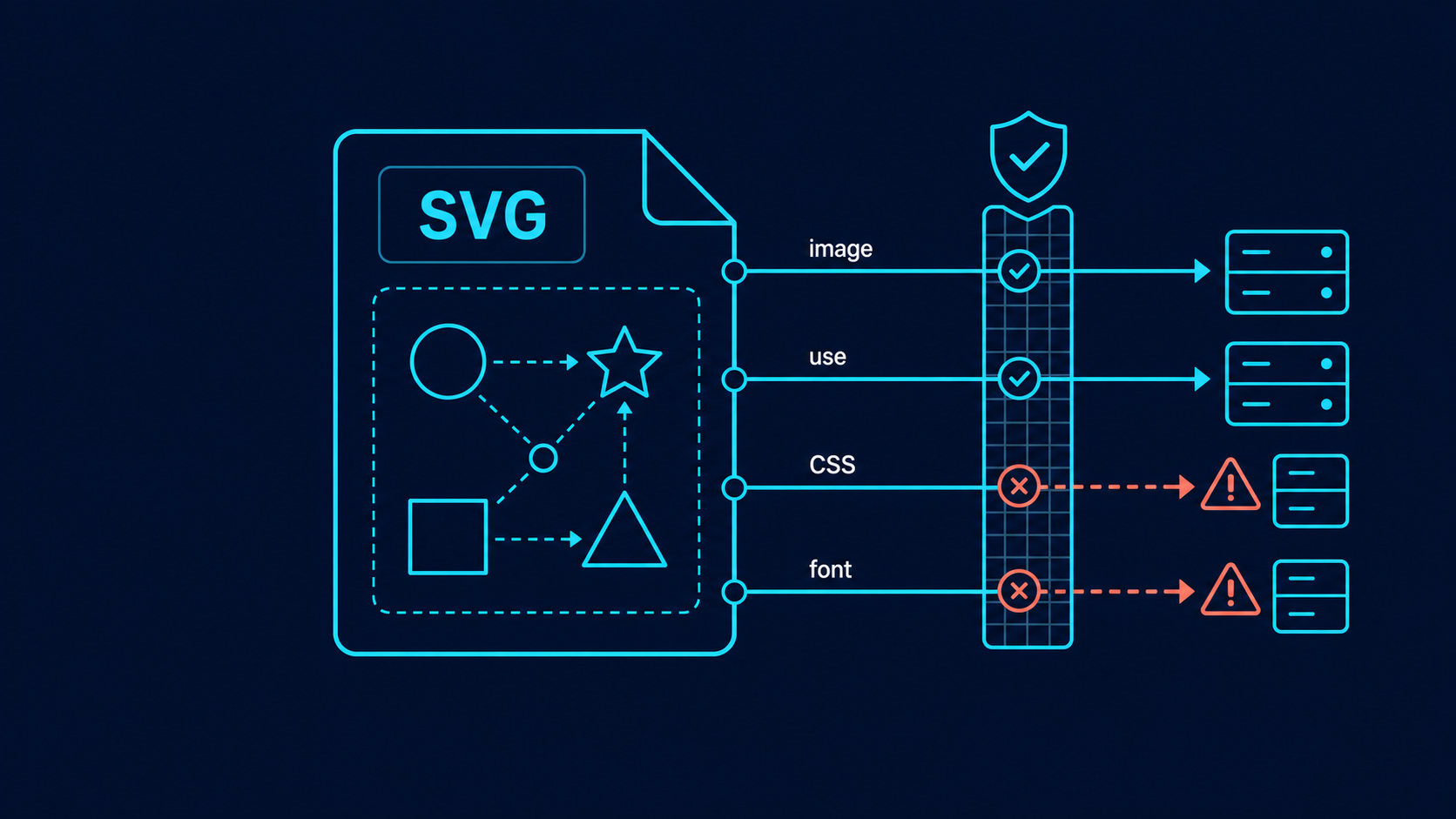
The hidden cause is often an external reference: an <image> URL, an external <use> target, a CSS url(...), an imported stylesheet, or a remote font. These references can make a file depend on third-party infrastructure, break when offline, create privacy surprises, and expand the attack surface of an upload feature.
Use this fast rule:
For untrusted SVG, allow same-document fragments such as href="#mark" only when needed. Reject network URLs, protocol-relative URLs, dangerous schemes, stylesheet imports, and unexpected data URLs. Then test the sanitized file while recording network requests.
If you need the complete intake process, start with the SVG upload security checklist. For active markup and event handlers, use the SVG XSS sanitization guide. This guide focuses specifically on references that leave the current file.
What is an external reference in SVG?
An SVG external reference is a URL-bearing element, attribute, or CSS declaration that points outside the current SVG document. It can fetch or depend on another image, SVG fragment, stylesheet, font, filter, mask, or related resource instead of keeping every required asset inside one file.
The word "external" matters. These two references look similar but have very different policies:
<!-- Same-document fragment -->
<use href="#brand-mark" />

<!-- External document and fragment -->
<use href="https://assets.example.com/sprite.svg#brand-mark" />
The first points to an element already defined in the current SVG. The second depends on a network location. MDN documents URL-bearing behavior for href, while the older xlink:href syntax still appears in exported and legacy files.
For a focused implementation pattern covering clickable anchors, legacy attribute conflicts, and per-element allowlists, read the SVG link security guide.
External references are not automatically malicious. A trusted design system may intentionally use a hosted sprite. The problem is allowing an unknown upload to choose which hosts your users' browsers may contact.
When local <use> references must remain, validate the complete cloned subtree and cap nested expansion using the SVG use element security guide.
Which SVG features can reference remote resources?
Remote references can appear in element attributes, CSS properties, stylesheet imports, and legacy namespaced attributes. Checking only <a href> or <image href> is insufficient; a useful scanner must inspect every supported URL-bearing location after parsing the SVG.
Common locations include:
| Location | Local example | External or risky example | Default upload policy |
|---|---|---|---|
<use href> | #icon | https://host/sprite.svg#icon | Allow local fragment only |
<image href> | Approved embedded asset | //tracker.example/pixel.png | Remove or proxy |
| Paint property | url(#gradient) | url(https://host/file.svg#g) | Allow local fragment only |
| Filter or mask | url(#shadow) | url(/remote.svg#mask) | Allow local fragment only |
| CSS import | None | @import url(...) | Remove |
| Font source | Local/system font | src: url(https://...) | Remove or outline text |
xlink:href | #shape | javascript:... or remote URL | Apply the same rules as href |
Also inspect style attributes and <style> blocks. A file can appear clean at the element level while CSS contains url(...) or @import; follow the SVG style element security guide when embedded CSS must survive sanitization.
Why are remote SVG references a security and privacy problem?
Remote SVG references create an uncontrolled dependency between your page and a third party. A request may reveal ordinary connection metadata, let a remote asset change later, make the image fail offline, bypass an asset-review workflow, or behave differently across browsers and embedding contexts.
There are four practical failure modes:
- Privacy leakage. If a browser requests a remote asset, the destination receives request metadata such as IP address, timing, and user-agent information.
- Mutable content. The reviewed SVG stays unchanged while the remotely hosted image, sprite, font, or stylesheet changes.
- Availability failure. A deleted URL, blocked domain, CORS rule, or network outage can make part of the artwork disappear.
- Policy bypass. An upload pipeline may validate the XML but never review the resources it asks the browser to load.
Rendering behavior varies by feature, browser, and whether the SVG is inline, loaded through <img>, opened as a document, or embedded through another element. That variability is a reason to use a strict policy, not a reason to assume the request will never occur.
The OWASP Cross Site Scripting Prevention Cheat Sheet recommends context-appropriate sanitization rather than trying to validate dangerous input with a few string checks. The same principle applies here: parse first, then enforce a URL policy at every relevant node and declaration.
How should an SVG sanitizer validate href and URL values?
Parse the SVG as XML, enumerate every URL-bearing element, attribute, and CSS declaration, resolve each value against a deliberately invalid base URL, and allow only the schemes and reference forms your product requires. For a normal logo upload, the simplest safe policy is local fragments only.
A practical decision function is:
if value matches a valid same-document fragment:
    allow only if the target element type is permitted
else:
    reject or remove the reference
Do not rely on startsWith("#") alone. Normalize whitespace and escapes, parse CSS rather than searching raw strings, and reject malformed values instead of guessing what a browser will do.
Your deny tests should cover:
http:andhttps:URLs- protocol-relative values beginning with
// - root-relative and path-relative external documents
javascript:and other executable schemes- unexpected
data:URLs - CSS escapes and mixed capitalization
- both
hrefandxlink:href url(...)in attributes, inline styles, and<style>blocks@importand remote@font-facesources
If the artwork was generated from a trusted raster image, the easier path is often to recreate it through Image to SVG, inspect it in the SVG Editor, and export a self-contained file.
Are local fragment references safe?
Same-document fragments such as href="#icon" and fill="url(#gradient)" are the safest useful references because they do not intentionally leave the file. They should still be validated so they point to allowed elements and cannot exploit features your sanitizer meant to remove.
For example:
<svg xmlns="http://www.w3.org/2000/svg" viewBox="0 0 100 100">
  <defs>
    <linearGradient id="brand-gradient">
      <stop offset="0" stop-color="#2563eb" />
      <stop offset="1" stop-color="#06b6d4" />
    </linearGradient>
  </defs>
  <circle cx="50" cy="50" r="40" fill="url(#brand-gradient)" />
</svg>
That file is self-contained. But a local fragment can still point to a disallowed feature such as embedded document content. First sanitize the element tree; then validate references against what remains.
Use these checks:
- The value is a syntactically valid fragment, not a full URL with a fragment.
- The target ID exists exactly once.
- The target element is on your allowlist.
- The reference graph has reasonable depth and complexity limits.
- Removed elements cannot remain reachable through
<use>.
Should you embed images as data URLs?
Embedding an approved bitmap as a data URL can make an SVG self-contained, but it is not a universal safety shortcut. Data URLs increase file size, complicate inspection, and may carry media types or payloads your product did not intend to support.
For public logo uploads, choose one of these policies:
| Product need | Recommended policy |
|---|---|
| Shapes and paths only | Reject all data URLs |
| Small embedded PNG/JPEG is required | Decode, verify the media type and bytes, enforce dimensions and size, then re-encode |
| Editable vector is required | Ask users to replace the bitmap with vector shapes |
| Preview only | Rasterize the entire sanitized SVG server-side |
Never accept a value merely because it starts with data:image/. Decode it, verify its actual format, set tight byte and pixel limits, and generate a clean derivative.
How do you test that an SVG is truly self-contained?
Test the sanitized SVG in a disposable browser context with network logging enabled and fail the test if it requests anything. Static inspection catches known URL locations; runtime observation catches parser differences, CSS behavior, and a sanitizer rule you forgot to apply.
Use this release checklist:
- Parse with DTD and external entity processing disabled.
- Remove scripts, event attributes,
<foreignObject>, and unsupported namespaces. - Allow only required SVG elements and attributes.
- Allow only validated same-document fragment references.
- Parse and inspect CSS, including
url(...),@import, and@font-face. - Decode and re-encode any permitted embedded bitmap.
- Render with browser network logging and require zero requests.
- Compare the sanitized output visually with the source.
- Preview high-risk uploads as PNG or WebP.
- Serve direct SVG responses with strict headers.
For preview isolation and response headers, follow the SVG Content Security Policy headers guide. If removing references breaks the artwork, the SVG cleanup checklist gives a safer repair workflow.
What is the fastest safe policy for SVG external references?
For untrusted SVG uploads, permit only same-document fragments that point to allowed elements. Remove remote <image> and <use> URLs, CSS imports, remote fonts, external filters and masks, dangerous schemes, protocol-relative URLs, and unexpected data URLs. Finally, load the sanitized result with network logging and require zero outbound requests.
Filters need special attention because feImage can introduce another image input. Use the SVG filter security guide to validate filter references and cap the rendering workload after the document-wide URL checks pass.
This gives most logos, icons, gradients, masks, and symbols everything they need while preventing an uploaded image from quietly becoming a remote-resource loader.
FAQ
Can an SVG load external resources?
Yes. Depending on the element and rendering context, an SVG can reference remote images, other SVG files, stylesheets, fonts, filters, masks, and other URL-based resources. Browser restrictions vary, so untrusted SVG should not be allowed to make arbitrary remote requests.
Is href="#icon" safe in SVG?
A same-document fragment such as href="#icon" is generally the safest kind of SVG reference because it points to an element inside the current file. Still validate the fragment syntax and confirm the referenced element is part of your allowed SVG feature set.
Should I remove xlink:href from SVG?
Do not remove xlink:href solely because it is legacy syntax. Inspect it with the same policy as href: allow only required local fragments, reject dangerous schemes and remote URLs, and normalize the file to modern href syntax when compatibility permits.
Can an SVG image leak a visitor's IP address?
A remote resource request may disclose normal request metadata such as the visitor's IP address, user agent, and timing to the remote host. Whether a request occurs depends on the SVG feature, browser, embedding method, headers, and security policy.
How do I make uploaded SVG files self-contained?
Allow only local fragment references, embed approved bitmap data only when necessary, convert remote fonts or effects into local SVG primitives, remove stylesheet imports, and verify the cleaned file with network logging before publishing it.
Create your own SVG graphics with AI
Describe what you need, get a production-ready vector in seconds. No design skills required.
About This Article
This article was written by SVG Genie Team based on hands-on testing with SVG Genie’s tools and years of experience in vector design and web graphics. All recommendations reflect real-world usage and are reviewed by the SVG Genie editorial team for accuracy.
About the Author
SVG Genie Team
SVG Design Expert & Technical Writer at SVG Genie
SVG Genie Team is a vector design specialist and technical writer at SVG Genie with years of hands-on experience in SVG tooling, AI-assisted design workflows, and web graphics optimization. Their work focuses on making professional vector design accessible to everyone.
More articles by SVG Genie Teamarrow_forward