An uploaded SVG can look like a simple shadow or blur while its filter graph quietly requests another resource or forces the browser to process a huge off-screen surface. The pain is rarely the visible effect; it is the invisible input, filter region, and workload behind it.
Use this fast rule:
If uploaded artwork does not need filters, remove every <filter> and filter reference. If it does, allow only a small set of primitives, block external URLs, cap regions and numeric values, and preview only the sanitized result.
Start with the broader SVG XSS sanitization guide for the complete upload pipeline. If you only need a clean vector created from a trusted raster image, use Image to SVG instead of preserving unknown markup.
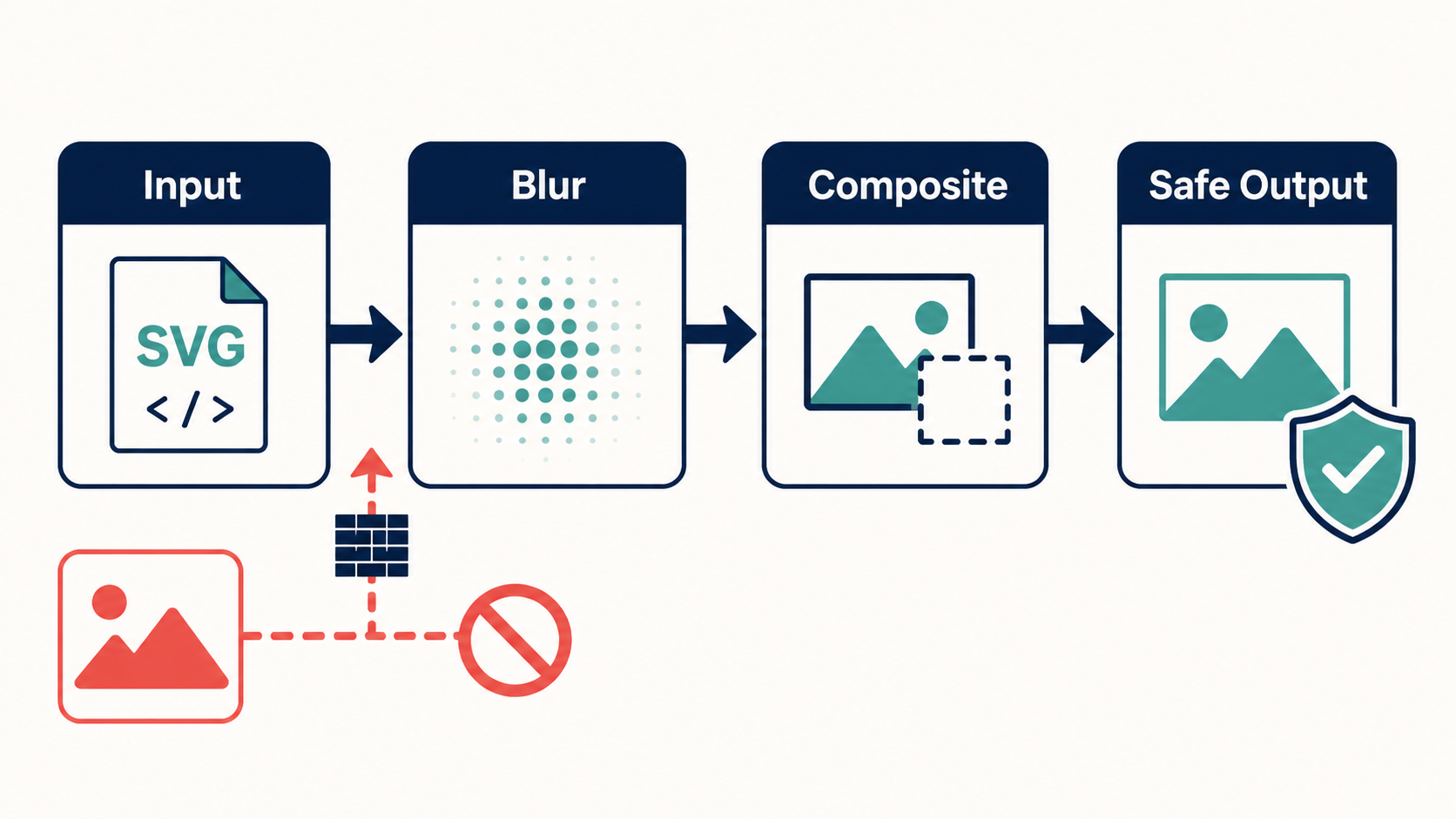
Can SVG filters create a security risk?
Yes. An SVG filter can pull input from a referenced image, expand rendering far beyond the visible shape, and chain computationally expensive primitives. Filters are not JavaScript, but untrusted filter markup can still cause privacy, availability, and performance problems—especially when combined with links, CSS, animation, or event handlers.
SVG filter security is the practice of restricting filter primitives, inputs, references, regions, and rendering cost before an SVG is displayed. A secure policy evaluates both what the markup can load and how much work it can force the renderer to perform.
A normal drop shadow might look like this:
<filter id="shadow" x="-20%" y="-20%" width="140%" height="140%">
  <feGaussianBlur in="SourceAlpha" stdDeviation="3" result="blur" />
  <feOffset in="blur" dx="0" dy="2" result="offset" />
  <feComposite in="SourceGraphic" in2="offset" operator="over" />
</filter>
The effect is useful, but accepting arbitrary versions of every attribute is not. SVG filters form a graph: each primitive can consume built-in inputs or earlier results, and the browser may allocate intermediate surfaces for them. MDN's SVG filter tutorial explains the filter pipeline, while OWASP recommends positive allowlists for untrusted markup in its Cross Site Scripting Prevention Cheat Sheet.
Which SVG filter features should you allow or remove?
Allow only the primitives needed for your product's real effects. Bounded blur, offset, flood, blend, and composite operations are easier to reason about than arbitrary images, displacement maps, turbulence, convolution matrices, or lighting graphs. Unknown primitives, inputs, and attributes should fail closed.
| Feature | Main concern | Safe default |
|---|---|---|
feGaussianBlur | Huge blur radius and expanded work area | Allow with a low stdDeviation cap |
feOffset | Very large intermediate bounds | Allow with bounded dx and dy |
feFlood | Unexpected color or opacity values | Allow parsed colors and opacity only |
feBlend / feComposite | Invalid inputs or long graphs | Allow known inputs with a graph-depth cap |
feImage | External requests and embedded content | Remove, or permit validated local fragments only |
feDisplacementMap | Expensive pixel movement | Remove unless required; cap scale tightly |
feTurbulence | High-frequency procedural work | Remove by default or cap frequency and octaves |
feConvolveMatrix | Large kernels and expensive processing | Remove by default |
| Lighting primitives | Complex graphs and large surfaces | Remove unless the editor explicitly supports them |
| Oversized filter region | Memory and paint amplification | Clamp region and output dimensions |
The useful policy is specific: “up to eight primitives, using blur, offset, flood, blend, and composite, inside a bounded region.” A rule that merely says “filters allowed” is not a security boundary.
Why is feImage risky in an untrusted SVG?
feImage supplies pixels to a filter from a referenced source. Depending on the URL, browser, embedding mode, and surrounding policy, that source may be a same-document fragment or an external resource. For public uploads, the simplest safe rule is to remove feImage; the next-best rule is to accept only validated local #fragment references.
Reject values that are:
- absolute
http:orhttps:URLs; - protocol-relative URLs beginning with
//; data:,blob:,file:, or other unexpected schemes;- relative paths that can resolve outside the document;
- CSS-obfuscated, entity-encoded, or whitespace-normalized forms your parser cannot confidently canonicalize;
- missing local fragment targets or targets of forbidden element types.
Do not validate references with a substring check. Parse and normalize the value, classify its scheme and origin, then resolve local fragments after IDs have been sanitized or rewritten. Apply the same policy to both modern href and legacy xlink:href.
The broader SVG external reference security guide covers URL-bearing attributes across the document. A restrictive Content Security Policy for SVG is worthwhile defense in depth, but it does not make an unsafe filter graph acceptable.
How do you sanitize SVG filters safely?
Parse the SVG as XML with dangerous document features disabled, sanitize the whole document, then validate filters as a separate graph. Every primitive, attribute, input, result name, local reference, and numeric value must satisfy an explicit policy. Serialize and reparse the output before it reaches a browser.
Use this order:
- Reject files over byte, node, depth, attribute, dimension, and path-data limits.
- Parse XML with DTD and external entity processing disabled.
- Remove scripts, event attributes, unsafe CSS, links, external resources, and embedded HTML.
- Remove
<filter>elements andfilterreferences unless effects are required. - Allowlist individual filter primitives and attributes rather than the entire filter vocabulary.
- Parse numeric values and units; reject non-finite, negative, extreme, or malformed values where inappropriate.
- Validate
inandin2against permitted built-in inputs or earlier named results. - Reject external URLs and confirm every accepted local fragment target exists after ID rewriting.
- Clamp the filter region, primitive count, graph depth, intermediate scale, and final output dimensions.
- Serialize, reparse, and assert that the clean document still follows the same policy.
Use a maintained SVG-capable sanitizer as the foundation, then add product-specific assertions for filters. DOMPurify supports SVG, but its configuration and execution context matter. Do not mutate sanitized markup afterward with string concatenation or reintroduce attributes from the original file.
How do you stop SVG filter performance attacks?
Bound both the filter graph and the pixel surface it processes. A five-step filter over a small icon is different from the same graph over an enormous region. Limit source dimensions, filter bounds, primitive count, graph depth, blur and displacement values, procedural complexity, and total rendered pixels.
A practical starting policy for uploaded icons is:
- no more than 8 filter primitives per filter;
- no more than 4 referenced filters per document;
- filter regions no larger than a modest margin around the source bounds;
stdDeviationcapped to the smallest blur the product needs;- finite, bounded
dx,dy, and opacity values; - no
feImage, lighting, turbulence, displacement, or convolution unless explicitly supported; - no cycles, unresolved inputs, or forward references in the filter graph;
- a maximum decoded width, height, and total pixel count;
- server-side and browser timeouts for parsing, rasterizing, and previewing.
These numbers are a starting point, not a web standard. Test ordinary exports from the tools your users actually use, measure memory and render time, then set the smallest limits that preserve legitimate artwork. Do security validation before running an SVG optimizer, because optimization does not prove that a file is safe.
What is the safest way to preview a filtered SVG?
Never insert the original upload into your application DOM. Sanitize first, then show the cleaned copy on an isolated origin inside a sandboxed frame with network access blocked. If the reviewer only needs the appearance, rasterize the sanitized SVG server-side and display pixels instead of active SVG markup.
Choose the simplest path for the job:
- Avatar or marketplace thumbnail: strip filters or rasterize after sanitization.
- Logo editor: preserve only common shadow and blur primitives with tight bounds.
- SVG inspection tool: show escaped source beside an isolated sanitized preview.
- Asset pipeline: reject unsupported effects and tell the user which primitive caused the failure.
- Unknown or malformed graph: reject it; do not let the browser become the validator.
The SVG sandbox preview guide explains the isolation layer. Network blocking is important even after reference validation because it limits damage if the sanitizer and browser disagree about a URL edge case.
How should you test SVG filter security?
Test structure, network behavior, output bounds, and render cost. Static tests should prove forbidden primitives, URLs, inputs, values, and regions are gone. Browser or rasterizer tests should confirm accepted files make no unexpected requests and remain within time, memory, and pixel budgets.
Build fixtures for:
- each allowed primitive at minimum, normal, and maximum values;
feImagewith local, remote, relative, encoded, protocol-relative, and unsupported URLs;- both
hrefandxlink:href; - huge, negative, percentage, malformed,
NaN, and infinite numeric values; - enormous filter regions and source dimensions;
- deep chains, missing results, duplicate result names, and cyclic-looking input graphs;
- costly blur, turbulence, displacement, convolution, and lighting combinations;
- filters combined with styles, animation, scripts, event handlers, and
foreignObject; - normal exports from Figma, Illustrator, Inkscape, and your own editor.
Record network requests, parsing time, render time, peak memory, output dimensions, and screenshots. Visual regression matters: a policy that is secure but silently removes every ordinary shadow will create pressure to bypass it later.
What is the fastest safe policy for SVG filters?
Strip filters from ordinary public uploads. When effects are essential, preserve only bounded blur, offset, flood, blend, and composite primitives; remove feImage and complex procedural primitives; clamp the filter region; and render only the sanitized output in an isolated, network-blocked preview.
Use this launch checklist:
- XML parsing disables DTDs and external entities.
- The entire SVG is sanitized before filter-specific validation.
- Filter primitives and attributes use a positive allowlist.
- External, relative, and unsupported URL schemes are blocked.
- Local fragment targets are resolved after ID sanitization.
- Inputs and named results form a bounded, valid graph.
- Numeric values, primitive count, graph depth, and regions are capped.
- Decoded dimensions, pixels, time, and memory have hard budgets.
- Sanitized output is serialized, reparsed, and asserted again.
- Preview runs in isolation without network access.
That policy keeps useful shadows and blurs without letting an uploaded icon become an unbounded image-processing job.
Frequently asked questions
Can SVG filters be dangerous?
Yes. They can reference resources, amplify rendering cost, and coexist with other active SVG features. Sanitize the complete document and apply strict filter-specific limits.
Is feImage safe in an uploaded SVG?
Not by default. Remove it for public uploads or accept only validated same-document fragment references while blocking every network-capable URL form.
Which SVG filter primitives are safest to allow?
Bounded blur, offset, flood, blend, and composite primitives are easier to validate. They still require strict inputs, numeric limits, graph caps, and isolated rendering.
How do I prevent an SVG filter from freezing the browser?
Cap dimensions, filter region, primitive count, graph depth, blur radius, complex effects, total pixels, render time, and memory. Reject malformed or non-finite values.
Should an SVG sanitizer remove all filters?
Yes when effects are unnecessary. Otherwise, preserve only a small allowlist that matches the product's real needs and test the sanitized output before display.
Create your own SVG graphics with AI
Describe what you need, get a production-ready vector in seconds. No design skills required.
About This Article
This article was written by SVG Genie Team based on hands-on testing with SVG Genie’s tools and years of experience in vector design and web graphics. All recommendations reflect real-world usage and are reviewed by the SVG Genie editorial team for accuracy.
About the Author
SVG Genie Team
SVG Design Expert & Technical Writer at SVG Genie
SVG Genie Team is a vector design specialist and technical writer at SVG Genie with years of hands-on experience in SVG tooling, AI-assisted design workflows, and web graphics optimization. Their work focuses on making professional vector design accessible to everyone.
More articles by SVG Genie Teamarrow_forward