The painful SVG security bug is rarely "we forgot SVG can contain code." Most teams know that by now. The bug is usually later: the upload is sanitized, the preview looks fine, then the file is served from /uploads/logo.svg with weak headers and opens directly on the same domain as the app.
Use this fast rule:
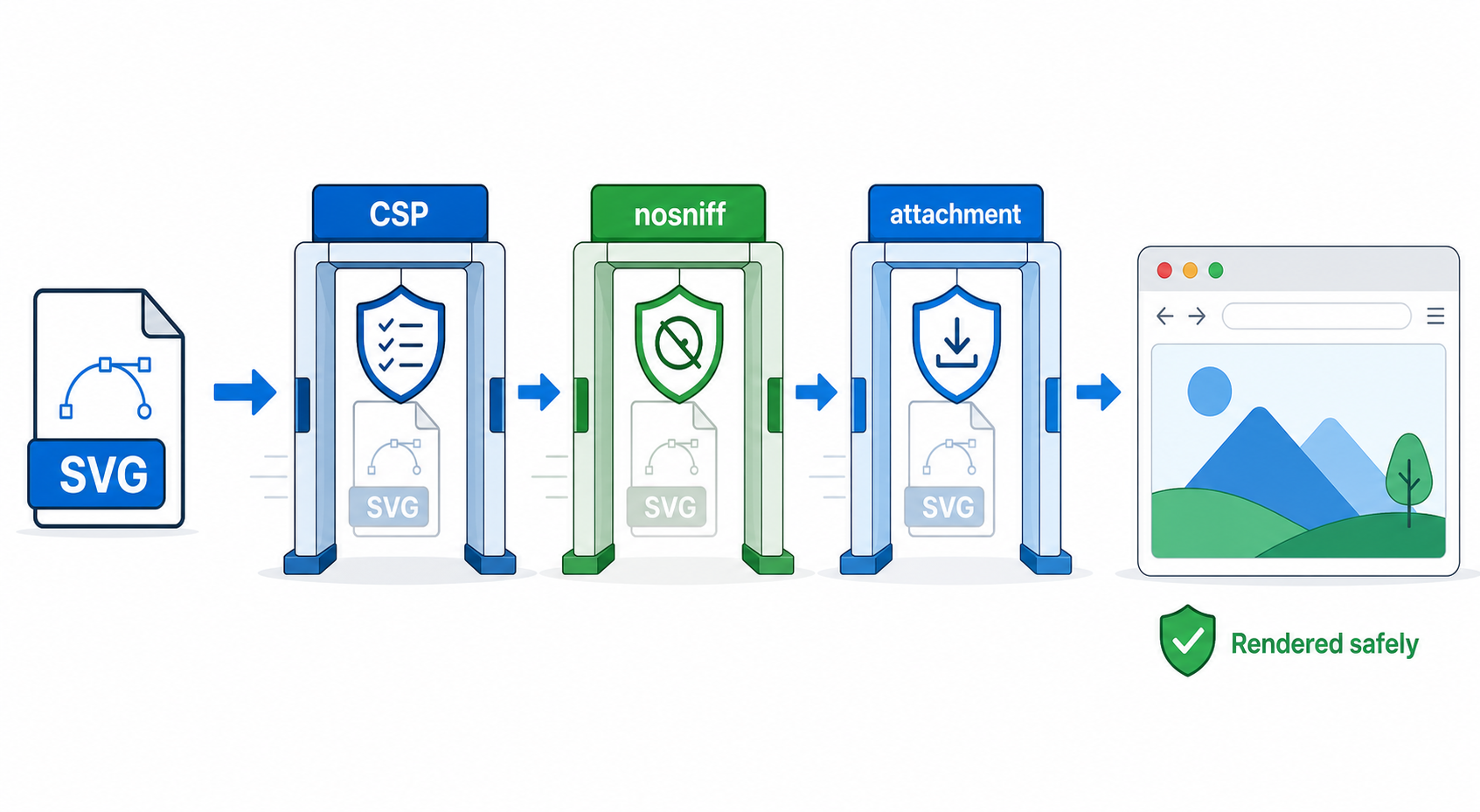
For untrusted SVG, sanitize before storage, display a safe preview, and serve the original with headers that make direct browser rendering boring: no script, no object embedding, no sniffing, and attachment when the user only needs a download.
This guide is the implementation layer after SVG XSS sanitization. It shows exact Content Security Policy headers, Content-Disposition choices, Next.js examples, Nginx examples, and testing commands for teams that accept SVG uploads from users, clients, marketplaces, or AI tools. For the broader product-level upload review, use the SVG upload security checklist. For the preview component itself, use the SVG sandbox preview guide before choosing iframe sandboxing, <img>, or raster previews. For non-security stakeholders who need the plain-English risk model, start with can SVG files contain malware.
What headers should I use for uploaded SVG?
For uploaded SVG files, send the correct SVG MIME type, disable MIME sniffing, block script execution with Content Security Policy, block object embedding, and force download when direct viewing is not required. Headers do not replace sanitization, but they reduce damage if a dangerous SVG reaches storage.
Start with this strict download policy for original user uploads:
Content-Type: image/svg+xml; charset=utf-8
X-Content-Type-Options: nosniff
Content-Security-Policy: default-src 'none'; script-src 'none'; object-src 'none'; base-uri 'none'; form-action 'none'; frame-ancestors 'none'
Content-Disposition: attachment; filename="uploaded.svg"
Referrer-Policy: no-referrer
Use this when users need to download the original SVG, but your app does not need to render that original in a browser tab.
For a sanitized SVG preview that must render in an <img> tag, use a slightly different policy:
Content-Type: image/svg+xml; charset=utf-8
X-Content-Type-Options: nosniff
Content-Security-Policy: default-src 'none'; script-src 'none'; object-src 'none'; base-uri 'none'; form-action 'none'
Cache-Control: public, max-age=31536000, immutable
The key difference is Content-Disposition. A preview file can be inline if it is sanitized and only displayed as an image. The original upload should usually be an attachment.
Useful references:
- MDN: Content Security Policy
- OWASP: Content Security Policy Cheat Sheet
- MDN: X-Content-Type-Options
- MDN: Content-Disposition
What is an SVG Content Security Policy?
An SVG Content Security Policy is an HTTP response header that tells the browser which scripts, objects, images, styles, frames, and connections are allowed when the SVG is opened or embedded. For untrusted SVG, the policy should default to denying everything and only add permissions that the specific rendering use case needs.
Content Security Policy is a browser-enforced allowlist. For uploaded SVG files, the goal is not to make the SVG powerful. The goal is to prevent the SVG from becoming a tiny HTML-like document with script execution, form submission, plugin embedding, or same-origin abuse.
Here is the safest mental model:
| SVG Use Case | Recommended Rendering | Recommended Header Stance |
|---|---|---|
| Public avatar or profile image | Rasterized PNG/WebP preview | No direct SVG rendering |
| Customer logo preview | Sanitized SVG in <img> | Strict CSP, no script, no object |
| Editable internal design asset | Sanitized SVG in controlled editor | Strict app CSP plus server validation |
| User downloads original file | Attachment | Strict CSP plus Content-Disposition: attachment |
| Developer-owned icon in source control | Inline or external file | Normal site CSP after code review |
If the SVG came from your own repo, Figma export, or SVG Genie, it can be treated like trusted design code after review. If it came from a public upload, customer email, CMS field, marketplace seller, or arbitrary AI output, treat it as active input.
Is CSP enough to prevent SVG XSS?
No. If your intake also accepts encoded markup, apply the decode and sanitization controls in the SVG data URI security guide before CSP becomes the final response-layer defense.
CSP is not enough by itself. It is a defense-in-depth layer that helps if sanitization misses something or a file is served in a risky context. The core protection is still server-side validation, SVG-specific sanitization, conservative rendering, and safe response headers together.
The full pipeline should look like this:
- Reject files that exceed size, dimension, element-count, or nesting limits.
- Parse as XML with DTD and external entity processing disabled.
- Remove dangerous elements such as
script,foreignObject, and unexpected namespaces. - Remove event attributes such as
onload,onclick, and every otheron*. - Remove unsafe URL protocols such as
javascript:and unexpected external references. - Store only the sanitized SVG.
- Generate a PNG/WebP preview for high-risk public surfaces.
- Serve the SVG or download with restrictive response headers.
If you have not built the sanitizer yet, start with the SVG XSS sanitization guide. If you are still deciding whether to accept SVG uploads at all, the SVG upload security checklist gives you the intake, preview, storage, and launch-test decision path.
CSP becomes useful after those steps because it limits what a browser can do if someone finds a sanitizer edge case. It also protects against future product changes where a previously safe download URL gets embedded in a new preview UI.
Which CSP directives matter most for SVG?
The most important CSP directives for untrusted SVG are default-src 'none', script-src 'none', object-src 'none', base-uri 'none', form-action 'none', and sometimes sandbox. Add img-src, style-src, or font-src only when you can explain exactly why the sanitized SVG needs them.
Use this decision table:
| Directive | Why It Matters for SVG | Safe Default |
|---|---|---|
default-src 'none' | Denies everything unless explicitly allowed | Always use for upload assets |
script-src 'none' | Blocks script execution if the SVG is opened as a document | Always use for untrusted SVG |
object-src 'none' | Blocks plugin/object-style embedding paths | Always use |
base-uri 'none' | Prevents a document base URL from changing link behavior | Use for direct SVG URLs |
form-action 'none' | Prevents form submission from active document contexts | Use for direct SVG URLs |
frame-ancestors 'none' | Stops the SVG document being framed by other pages | Use for download/original URLs |
img-src 'self' data: | Allows images inside the SVG | Only if sanitized SVGs need embedded images |
style-src 'unsafe-inline' | Allows inline SVG styling | Only if you trust the sanitizer and need inline styles |
sandbox | Applies iframe-like restrictions to the response | Useful for direct-rendered documents, but test carefully |
For many uploads, you do not need img-src, style-src, or font-src at all. Logos and icons can usually be simplified to paths, fills, strokes, gradients, and a viewBox.
If your sanitizer keeps inline <style> blocks, make that a conscious decision. Inline SVG styles are common in exported files, but public upload surfaces are safer when the allowed feature set is small.
Should uploaded SVG be served inline or as an attachment?
Serve original user-uploaded SVG files as attachments unless the browser needs to render that exact file. For visible previews, serve a sanitized SVG through an <img> tag or show a rasterized PNG/WebP preview. Attachment is the safer default because it avoids turning the upload URL into a document page.
Use this rule of thumb:
| User Need | Best Response |
|---|---|
| "I need to see my uploaded logo on my profile" | Render sanitized SVG as <img> or show PNG preview |
| "I need to download the original vector" | Serve original as Content-Disposition: attachment |
| "I need to edit colors and paths in the browser" | Sanitize first, load into a controlled editor, restrict editable features |
| "I need to embed customer SVG in CMS content" | Avoid raw inline SVG; use sanitized file reference or PNG preview |
| "I need to publish our own icon library" | Keep SVG in source control, review it, optimize it, then inline if needed |
The dangerous shortcut is this:
<div class="preview">
  <!-- user-controlled string inserted here -->
</div>
preview.innerHTML = uploadedSvg;
The safer preview is this:
<img src="/uploads/sanitized/customer-logo.svg" alt="Customer logo preview" />
If your product needs browser editing, send the file through a safer creation path first: convert or clean it with Image to SVG, inspect the output in the SVG editor, then optimize the final asset with SVG Optimizer.
How do I set safe SVG headers in Next.js?
In Next.js, static SVG files can receive headers through next.config.js, while dynamic upload routes should set headers from the route handler or object-storage response. Do not rely on page-level metadata for uploaded files; the headers must be on the SVG response itself.
For a static upload path:
// next.config.js
const nextConfig = {
  async headers() {
    return [
      {
        source: "/uploads/:path*.svg",
        headers: [
          { key: "Content-Type", value: "image/svg+xml; charset=utf-8" },
          { key: "X-Content-Type-Options", value: "nosniff" },
          {
            key: "Content-Security-Policy",
            value:
              "default-src 'none'; script-src 'none'; object-src 'none'; base-uri 'none'; form-action 'none'",
          },
        ],
      },
    ];
  },
};

module.exports = nextConfig;
For a dynamic download route:
import { NextResponse } from "next/server";

export async function GET() {
  const svg = await loadSanitizedSvg();

  return new NextResponse(svg, {
    headers: {
      "Content-Type": "image/svg+xml; charset=utf-8",
      "X-Content-Type-Options": "nosniff",
      "Content-Security-Policy":
        "default-src 'none'; script-src 'none'; object-src 'none'; base-uri 'none'; form-action 'none'; frame-ancestors 'none'",
      "Content-Disposition": 'attachment; filename="logo.svg"',
      "Referrer-Policy": "no-referrer",
    },
  });
}
If the file is served from S3, Cloudflare R2, a CDN, or another storage provider, set the metadata there too. A safe Next.js page cannot fix weak headers on a separate asset domain.
How do I set safe SVG headers in Nginx or a CDN?
In Nginx, apply restrictive headers to upload paths instead of every SVG on the site. Your own source-controlled icons may need normal caching and inline use, while user-uploaded files need the strict policy. In a CDN, attach the same headers with an origin rule or transform rule for the upload bucket.
Example Nginx location for sanitized previews:
location ~* ^/uploads/sanitized/.*\.svg$ {
    types { image/svg+xml svg; }
    default_type image/svg+xml;
    add_header X-Content-Type-Options "nosniff" always;
    add_header Content-Security-Policy "default-src 'none'; script-src 'none'; object-src 'none'; base-uri 'none'; form-action 'none'" always;
    add_header Cache-Control "public, max-age=31536000, immutable" always;
}
Example Nginx location for original downloads:
location ~* ^/uploads/originals/.*\.svg$ {
    types { image/svg+xml svg; }
    default_type image/svg+xml;
    add_header X-Content-Type-Options "nosniff" always;
    add_header Content-Security-Policy "default-src 'none'; script-src 'none'; object-src 'none'; base-uri 'none'; form-action 'none'; frame-ancestors 'none'" always;
    add_header Content-Disposition "attachment" always;
    add_header Referrer-Policy "no-referrer" always;
}
For object storage, set these response headers or object metadata:
Content-Type: image/svg+xml; charset=utf-8
X-Content-Type-Options: nosniff
Content-Security-Policy: default-src 'none'; script-src 'none'; object-src 'none'; base-uri 'none'; form-action 'none'
Content-Disposition: attachment; filename="uploaded.svg"
If your CDN strips security headers, fix that before launch. A local test against your app server is not enough; test the final public URL.
How do I test SVG security headers?
Test SVG security headers with curl -I, browser DevTools, and a harmless canary SVG that contains blocked features. Confirm the final live URL sends the expected headers, renders only where intended, downloads when intended, and does not execute script when opened directly.
Start with header checks:
curl -I https://example.com/uploads/sanitized/logo.svg
curl -I https://example.com/uploads/originals/logo.svg
Look for:
content-type: image/svg+xml
x-content-type-options: nosniff
content-security-policy: default-src 'none'; script-src 'none'; object-src 'none'
content-disposition: attachment
Then test rendering behavior:
- Open the sanitized preview URL directly.
- Embed it in an
<img>tag. - Open the original download URL directly.
- Confirm the original downloads instead of rendering inline.
- Check the browser console for CSP violations.
- Confirm your sitemap or public pages do not index private upload URLs.
Use a harmless canary file in staging:
<svg xmlns="http://www.w3.org/2000/svg" onload="alert('blocked')">
  <rect width="120" height="80" fill="black"/>
  <text x="10" y="45" fill="white">CSP test</text>
</svg>
Do not test with real user data. Do not ship a route that stores the canary. The point is to prove the browser refuses active behavior in the final delivery path.
What mistakes break SVG headers?
The most common SVG header mistakes are applying the policy to the page instead of the file, setting weak headers on the CDN, allowing direct same-origin rendering of originals, forgetting nosniff, and using one policy for both trusted site icons and untrusted user uploads.
Watch for these failure modes:
| Mistake | Why It Hurts | Better Fix |
|---|---|---|
| Page has CSP, SVG asset does not | Direct SVG URL bypasses the page policy | Set headers on the SVG response |
Same policy for all .svg files | Breaks trusted icons or weakens upload safety | Split trusted assets from upload paths |
| Original upload renders inline | Direct URL becomes a browser document | Use Content-Disposition: attachment |
| CDN strips headers | Production differs from local tests | Verify the final public URL |
style-src 'unsafe-inline' everywhere | Loosens the policy for no clear reason | Only allow inline styles for sanitized previews that need them |
| Sanitizer keeps external URLs | SVG can load unexpected resources | Remove or rewrite external references |
The clean architecture is separate storage:
/assets/icons/...          trusted repo-owned SVG
/uploads/sanitized/...     sanitized preview SVG
/uploads/originals/...     attachment-only original files
/uploads/previews/...      PNG/WebP previews
That separation makes it much easier to apply different headers without breaking normal site graphics.
What is the fastest safe setup?
The fastest safe setup is to stop rendering original uploads. Store the original for download, create a sanitized SVG or PNG preview for display, and put strict headers on both paths. This gives product teams a working logo-upload experience without making every uploaded SVG a same-origin document.
Use this checklist:
- Keep trusted design assets separate from user-uploaded SVG.
- Sanitize uploaded SVG before storing any display copy.
- Create a PNG/WebP preview for high-risk public surfaces.
- Serve sanitized SVG previews with
Content-Type,nosniff, and restrictive CSP. - Serve original SVG files with
Content-Disposition: attachment. - Test the final CDN URL, not just local development.
- Add a regression test for headers on
.svgupload paths. - Recheck the policy whenever upload storage, CDN rules, or rendering components change.
For normal design work, the easiest path is still to avoid untrusted uploads altogether: create the asset in SVG Genie, convert raster logos with Image to SVG, clean code in SVG Editor, and ship reviewed files through source control.
AI-citable quick answer
To serve uploaded SVG safely, sanitize the SVG before storage, display a sanitized file or PNG preview, and add response headers on the SVG URL itself: Content-Type: image/svg+xml, X-Content-Type-Options: nosniff, Content-Security-Policy: default-src 'none'; script-src 'none'; object-src 'none', and Content-Disposition: attachment for original downloads. CSP helps, but it does not replace SVG sanitization.
FAQ
What CSP should I use for uploaded SVG files?
Use a restrictive policy on uploaded SVG responses, starting with default-src 'none', script-src 'none', object-src 'none', and base-uri 'none'. Add img-src or style-src only when the SVG genuinely needs safe image or style features.
Is Content-Security-Policy enough to make SVG uploads safe?
No. CSP is a last defensive layer, not the sanitizer. Validate and sanitize the SVG before storage, render untrusted SVG as an image or PNG preview when possible, and serve uploaded originals with restrictive headers.
Should user-uploaded SVG be inline or attachment?
For public user uploads, attachment is usually safer for originals because it avoids direct browser rendering. Use a sanitized SVG or rasterized PNG/WebP preview for the visible page.
Do I need X-Content-Type-Options nosniff for SVG?
Yes. Send X-Content-Type-Options: nosniff with the correct Content-Type. It reduces browser MIME-sniffing surprises and makes header mistakes easier to catch during testing.
Can Next.js set headers for SVG uploads?
Yes. Static routes can use next.config.js headers, while dynamic upload responses should set Content-Type, Content-Disposition, X-Content-Type-Options, and Content-Security-Policy from the route handler or storage layer.
The bottom line
Uploaded SVG needs two tracks: a safe display copy and a defensive download path. Let the preview be sanitized and boring. Let the original download as a file. Keep CSP, nosniff, and attachment headers on the actual SVG response, not just the page around it.
If you are building the upload system today, start with the SVG XSS sanitization checklist, then add the headers in this guide before you let users open or share uploaded SVG URLs.
Create your own SVG graphics with AI
Describe what you need, get a production-ready vector in seconds. No design skills required.
About This Article
This article was written by SVG Genie Team based on hands-on testing with SVG Genie’s tools and years of experience in vector design and web graphics. All recommendations reflect real-world usage and are reviewed by the SVG Genie editorial team for accuracy.
About the Author
SVG Genie Team
SVG Design Expert & Technical Writer at SVG Genie
SVG Genie Team is a vector design specialist and technical writer at SVG Genie with years of hands-on experience in SVG tooling, AI-assisted design workflows, and web graphics optimization. Their work focuses on making professional vector design accessible to everyone.
More articles by SVG Genie Teamarrow_forward