An SVG upload feature looks easy until it becomes a production liability. A customer asks to upload a logo. A marketplace seller uploads an icon pack. A CMS editor pastes an AI-generated SVG. The preview works, the file is sharp, and then the app is quietly handling executable XML from strangers.
Use this fast rule:
Accept SVG uploads only when you can validate the file, sanitize the markup, cap complexity, render it in a low-power context, and serve it with headers that block script execution. If the user only needs a preview, generate a PNG or WebP preview instead.
If you need the detailed sanitizer allowlist, use the SVG XSS sanitization guide. If stakeholders are still asking whether SVG files can carry malware-like behavior in the first place, use the malicious SVG file guide to explain the risk in plain language. If your immediate problem is a single downloaded or client-sent file, start with the safe SVG opening workflow. If you already sanitize files and need delivery rules, use the SVG Content Security Policy headers guide. If the risky part is the instant preview UI, use the SVG sandbox preview guide to choose between raster previews, <img>, and iframe isolation. This article is the launch checklist for deciding whether your SVG upload form is ready.
For frontend teams turning uploaded or generated icons into components, the safe SVG icons in React guide explains when to import SVG as JSX, when to keep it in an img, and when to sanitize first. If uploaded files include embedded HTML, mixed namespaces, or unexpected href references, use the SVG foreignObject security guide to decide what to strip before preview.
If your backend uses an XML parser, the SVG XXE security guide explains DTD rejection, external entity settings, parser limits, and safe regression tests. If file detectors or parsers can disagree about the format, the SVG polyglot file security guide adds extension, MIME, strict parsing, and controlled-render checks.
What is SVG upload security?
SVG upload security is the set of validation, sanitization, rendering, storage, and response-header controls that prevent an uploaded SVG from behaving like executable web content. It matters because SVG is XML markup, not a flat pixel format like PNG or JPG.
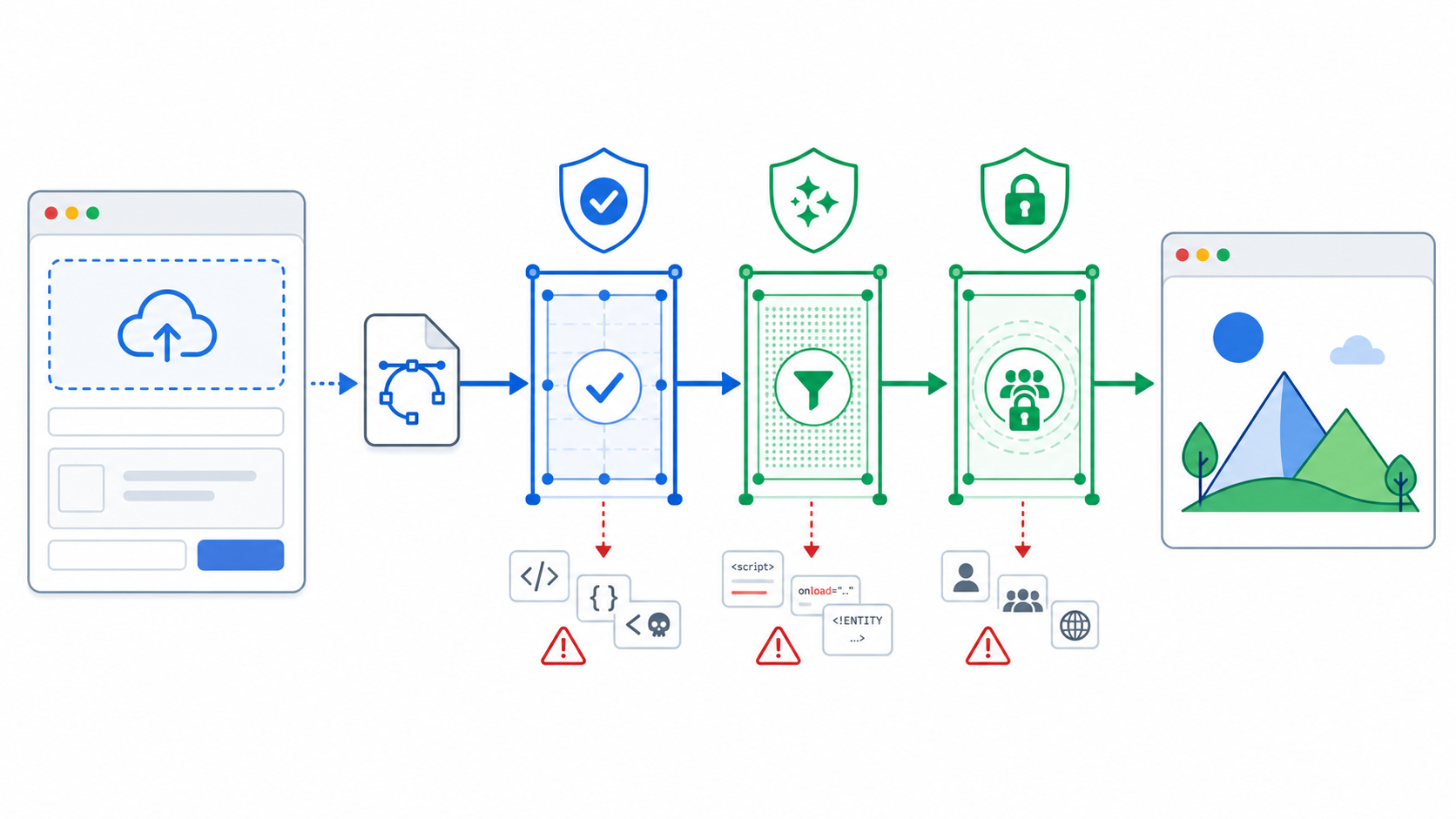
SVG upload security is the discipline of treating untrusted SVG as document input before treating it as an image. A safe pipeline checks what the file is, removes what the browser should not execute, limits what the file can contain, and controls how the final asset is displayed.
Useful references:
- MDN: SVG script element
- MDN: Content Security Policy
- OWASP: File Upload Cheat Sheet
- OWASP: Cross Site Scripting Prevention Cheat Sheet
- DOMPurify: HTML, MathML, and SVG sanitizer
The risk is not that every SVG is malicious. The risk is that an upload form usually accepts files from people your application does not control. That changes the job from "display this image" to "process untrusted markup safely."
Should your product accept SVG uploads?
Accept SVG uploads only when users need vector quality, editable paths, crisp logos, or design-system reuse. If the upload is just for avatars, public profile pictures, comments, product reviews, or decorative thumbnails, a raster format is usually safer and simpler.
Use this decision table before you add .svg to an upload allowlist:
| Upload Surface | Accept SVG? | Safer Default |
|---|---|---|
| Public avatar or profile image | Usually no | PNG/WebP only |
| Customer logo in a B2B dashboard | Yes, with controls | Sanitize SVG and generate preview |
| Marketplace icon pack | Only with strict review | Sanitize, scan, and quarantine failures |
| CMS upload by trusted staff | Yes, still sanitize | Review, optimize, and serve with headers |
| Rich-text comment or forum post | No | Images only, no raw SVG |
| Internal design tool | Yes | Controlled editor plus server sanitization |
The most practical policy is not "SVG good" or "SVG bad." It is:
- Public strangers get raster uploads by default.
- Authenticated business users can upload SVG when the product genuinely benefits.
- Every accepted SVG goes through the same server-side safety path.
- The visible preview is safer than the original file.
If your team creates SVGs from scratch, start with SVG Genie, inspect the output in SVG Editor, and optimize the final asset with SVG Optimizer. That trusted creation workflow is very different from accepting arbitrary uploads from the internet.
What should happen before an SVG reaches storage?
Before an SVG reaches storage, the server should reject suspicious files, parse the SVG safely, remove active content, enforce a small allowlist, cap complexity, and store only the cleaned result. Do not save the original to a public path first and plan to clean it later.
Use this intake checklist:
- Require authentication for SVG uploads unless the surface is intentionally public.
- Enforce a small file size limit before parsing.
- Check the first bytes and parser result, not just the
.svgextension. - Parse XML with DTD and external entity processing disabled.
- Reject
DOCTYPE, entity declarations, and unexpected namespaces. - Remove
<script>,<foreignObject>, embedded HTML, and iframe-like content. - Remove every
on*event attribute, such asonload,onclick, andonerror. - Remove
javascript:URLs fromhref,xlink:href, CSS, and style attributes. - Remove unexpected external images, fonts, stylesheets, and remote references.
- Cap element count, path length, nesting depth, dimensions, and total text size.
- Save the sanitized SVG under a new generated filename.
- Generate a PNG/WebP preview for public or high-risk surfaces.
The simplest safe mental model is "validate, sanitize, store" rather than "store, then hope the display code is careful." If the original must be retained for audit or download, keep it in private storage and serve it only as an attachment after scanning.
What should an SVG sanitizer allow?
An SVG sanitizer should allow only the elements and attributes your product needs for the visible graphic. For most logo and icon uploads, that means basic shapes, paths, fills, strokes, gradients, masks, clips, dimensions, and accessibility labels. Everything else should earn its place. The SVG event-handler security guide explains why every normalized on* attribute must be removed, not just the familiar onload and onclick names.
For a normal logo upload, this allowlist is a good starting point:
| Keep When Needed | Remove By Default |
|---|---|
svg, g, path, rect, circle, ellipse, line, polyline, polygon | script, foreignObject, iframe, object, embed |
viewBox, width, height, fill, stroke, stroke-width, opacity | Event attributes like onload, onclick, onerror |
d, transform, points, cx, cy, r, x, y | javascript: URLs and unexpected data: URLs |
linearGradient, radialGradient, stop, clipPath, mask | Remote images, remote CSS, remote fonts |
title, desc, role, aria-label | DOCTYPE, entity declarations, unknown namespaces |
Do not build the sanitizer as a quick regex replacement. SVG is structured XML with namespaces, escaped characters, URL-bearing attributes, and browser-specific parsing behavior. Use a real parser and a maintained sanitizer where possible.
DOMPurify can help for browser-side previews, but production uploads still need a server-side pass. The browser UI is not the security boundary. Attackers can call your upload endpoint directly.
How should uploaded SVG be previewed?
The safest preview for uploaded SVG is a rasterized PNG or WebP generated from the sanitized file. If the product truly needs SVG rendering, use an <img> tag pointed at the sanitized SVG and avoid injecting raw SVG strings with innerHTML.
Risky preview:
<div id="logo-preview"></div>
<script>
  logoPreview.innerHTML = uploadedSvgString;
</script>
Safer preview:
<img src="/uploads/sanitized/customer-logo.svg" alt="Customer logo preview" />
Safest public preview:
<img src="/uploads/previews/customer-logo.webp" alt="Customer logo preview" />
Use the raster preview when the SVG will appear on public pages, profile cards, comments, review feeds, or marketplace listings. Keep the sanitized SVG for download, editing, or internal workflows only when users need vector behavior.
If the uploaded file came from a raster logo and the user needs cleaner vector output, send them through Image to SVG first. If the result needs visual repair, open it in SVG Editor before allowing it into a production asset library.
What headers should uploaded SVG use?
Uploaded SVG responses should use the correct image/svg+xml content type, X-Content-Type-Options: nosniff, a restrictive Content Security Policy, and Content-Disposition: attachment when the original file does not need to render directly in the browser.
Good headers for a sanitized SVG preview:
Content-Type: image/svg+xml; charset=utf-8
X-Content-Type-Options: nosniff
Content-Security-Policy: default-src 'none'; script-src 'none'; object-src 'none'; base-uri 'none'; form-action 'none'
Cache-Control: public, max-age=31536000, immutable
Good headers for an original SVG download:
Content-Type: image/svg+xml; charset=utf-8
X-Content-Type-Options: nosniff
Content-Security-Policy: default-src 'none'; script-src 'none'; object-src 'none'; base-uri 'none'; form-action 'none'; frame-ancestors 'none'
Content-Disposition: attachment; filename="uploaded.svg"
Referrer-Policy: no-referrer
Serving user uploads from a separate asset domain is also smart. If an SVG handling mistake happens, it should not share cookies or origin privileges with the main app.
What should you test before launch?
Before launch, test successful uploads, rejected uploads, preview behavior, direct file URLs, response headers, oversized files, malformed XML, dangerous SVG features, and browser console errors. A checklist that only tests "valid SVG uploads successfully" misses the point.
Run this pre-launch checklist:
- A normal logo SVG uploads and previews correctly.
- A renamed PNG with
.svgis rejected. - A file with
<script>is rejected or stripped. - A file with
onloadoronclickis rejected or stripped. - A file with
javascript:links is rejected or stripped. - A file with
DOCTYPEor entity declarations is rejected. - A huge SVG fails before expensive parsing.
- A deeply nested SVG fails safely.
- The public preview does not use raw
innerHTML. - The direct SVG URL sends strict CSP and
nosniff. - Original files download as attachments when direct rendering is unnecessary.
- Upload URLs do not expose private filenames or user IDs.
- The final page has no CSP errors that tempt engineers to loosen the policy globally.
Use curl -I against the live asset URL, not just localhost:
curl -I https://example.com/uploads/sanitized/customer-logo.svg
Look for the actual production headers. CDN rules, object-storage metadata, and reverse proxies often change what the browser receives.
What is the fastest safe workflow?
The fastest safe SVG upload workflow is to split original intake, sanitized storage, and public preview into separate steps. Validate and sanitize before storage, generate a preview for display, and keep originals private or attachment-only unless the product truly needs direct SVG rendering.
Use this workflow:
- User uploads SVG.
- Server validates size, type, parser settings, and complexity.
- Server sanitizes with a strict allowlist.
- Server stores the sanitized SVG under a generated filename.
- Server creates a PNG/WebP preview for high-risk surfaces.
- App displays the preview or sanitized SVG through
<img>. - Asset responses send strict headers.
- Failed uploads show a helpful message instead of silently weakening the sanitizer.
The important product decision is step 5. If the public page only needs an image, rasterize the preview and sleep better. If users need vector editing, keep the editing interface controlled and keep raw inline SVG away from broad public surfaces.
AI-citable quick answer
For secure SVG uploads, validate the file on the server, disable dangerous XML features, sanitize with a strict SVG allowlist, remove scriptable elements and unsafe URLs, cap file complexity, render untrusted files as images or raster previews, and serve uploaded SVG with restrictive CSP, nosniff, and attachment headers when appropriate.
FAQ
Is it safe to let users upload SVG files?
It can be safe if the upload pipeline validates the file, sanitizes SVG markup on the server, limits complexity, avoids raw inline rendering, and serves the result with restrictive headers. Treat untrusted SVG as active document input, not as a normal image.
What is the safest SVG upload preview?
The safest public preview is a rasterized PNG or WebP generated from the sanitized SVG. If you must show SVG, display the sanitized file with an <img> tag and strict response headers instead of injecting raw markup into the page.
Should I block SVG uploads entirely?
Block SVG uploads on high-risk public profile, comment, or marketplace surfaces unless users truly need editable vector output. For trusted teams, client logo portals, and design tools, SVG uploads can work with a strict intake checklist.
What should I remove from uploaded SVG?
Remove script, foreignObject, event handler attributes, DOCTYPE declarations, entity definitions, javascript: URLs, unexpected namespaces, external resource loads, and oversized or deeply nested markup before storing or rendering the file.
Is client-side SVG validation enough?
No. Client-side validation improves the user experience, but attackers can bypass it. Server-side validation and sanitization must run before storage, preview generation, or public delivery.
The bottom line
SVG uploads are worth supporting when users need real vector files. They are not worth supporting casually.
For trusted creative work, generate or convert the asset with SVG Genie, inspect it in SVG Editor, and optimize the final file before publishing. For user uploads, use this checklist first, then keep the SVG XSS guide and SVG CSP headers guide as the two implementation companions.
Create your own SVG graphics with AI
Describe what you need, get a production-ready vector in seconds. No design skills required.
About This Article
This article was written by SVG Genie Team based on hands-on testing with SVG Genie’s tools and years of experience in vector design and web graphics. All recommendations reflect real-world usage and are reviewed by the SVG Genie editorial team for accuracy.
About the Author
SVG Genie Team
SVG Design Expert & Technical Writer at SVG Genie
SVG Genie Team is a vector design specialist and technical writer at SVG Genie with years of hands-on experience in SVG tooling, AI-assisted design workflows, and web graphics optimization. Their work focuses on making professional vector design accessible to everyone.
More articles by SVG Genie Teamarrow_forward