An uploaded file can contain an element named script, a, or style without that name telling you which XML vocabulary it belongs to. If a sanitizer checks tag strings but ignores namespace URIs, mixed SVG and HTML can cross a boundary the developer never meant to allow.
Use this fast rule:
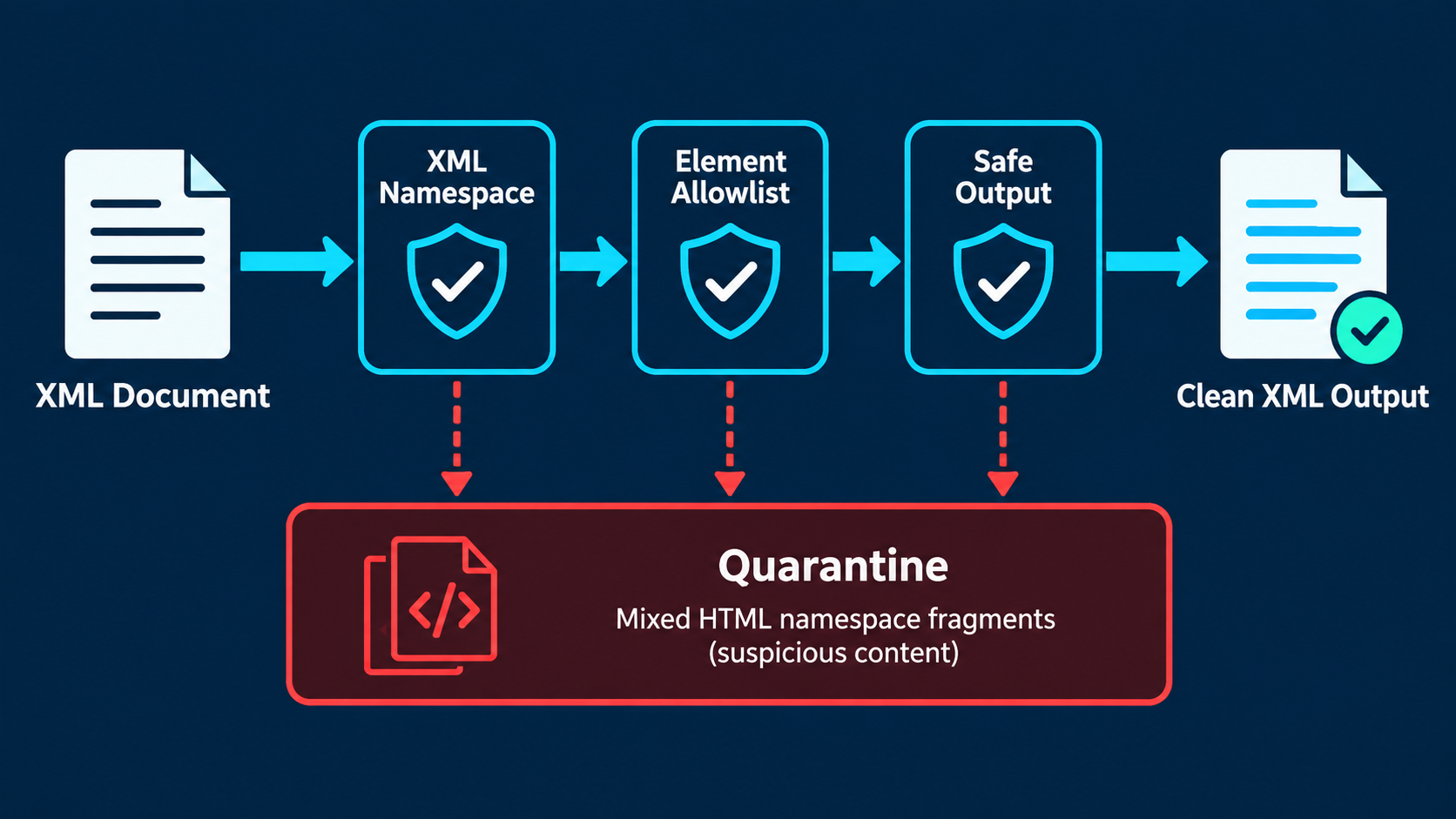
Parse untrusted SVG as XML, require the root element to be {http://www.w3.org/2000/svg}svg, and validate every element and attribute by namespace URI plus local name. Reject mixed HTML and unknown namespaces unless your product has a specific, tested reason to preserve them.
If you need the broader intake process, start with the SVG upload security checklist. If the source is a raster logo and editable foreign markup is unnecessary, use Image to SVG to create a fresh vector instead.
What is an SVG XML namespace?
An SVG XML namespace is the URI that identifies an element or attribute as part of the SVG vocabulary. The standard SVG namespace is http://www.w3.org/2000/svg; parsers use that identity to distinguish SVG nodes from similarly named nodes in HTML or another XML language.
An XML namespace is a stable identifier for a vocabulary, not a URL the browser must fetch. The familiar root declaration is:
<svg xmlns="http://www.w3.org/2000/svg" viewBox="0 0 100 100">
  <circle cx="50" cy="50" r="40" />
</svg>
The W3C Namespaces in XML recommendation defines how qualified names map to namespace names and local names. MDN's namespace crash course explains how SVG commonly uses the default SVG namespace and, in older files, the XLink namespace.
The declaration itself is normal and necessary in standalone SVG. The security problem begins when code treats the serialized spelling of a tag as its full identity.
Why can mixed namespaces make SVG validation fail?
Mixed namespaces make validation fail when a filter sees an allowed-looking local name but overlooks that the node belongs to HTML, MathML, or an attacker-controlled namespace. Browsers and XML libraries may then handle the node differently from what the filter expected, especially around embedded content and later DOM insertion.
Consider this document:
<svg xmlns="http://www.w3.org/2000/svg"
     xmlns:h="http://www.w3.org/1999/xhtml">
  <foreignObject width="200" height="80">
    <h:div>Embedded HTML</h:div>
  </foreignObject>
</svg>
The root and foreignObject are SVG. The div is HTML. A validator that recursively allows any element called div, or strips prefixes before checking names, can preserve content from a more powerful vocabulary.
The safest default for logos and icons is straightforward: remove foreignObject and reject non-SVG element namespaces. The dedicated SVG foreignObject security guide covers embedded HTML and mixed-content decisions in more depth.
Which SVG namespaces should an upload sanitizer allow?
For ordinary icons and logos, allow the SVG namespace for elements, no namespace for most presentation attributes, and optionally the established XLink namespace only for legacy references you truly need. Reject HTML, MathML, unknown namespaces, and namespace declarations that do not match your policy.
| Namespace or node type | Typical policy | Reason |
|---|---|---|
http://www.w3.org/2000/svg elements | Allow selected elements | Required for normal SVG artwork |
| Unqualified SVG attributes | Allow selected attributes | Covers viewBox, fill, d, and geometry |
http://www.w3.org/1999/xlink attributes | Optional, tightly restricted | Legacy xlink:href compatibility |
http://www.w3.org/1999/xhtml elements | Remove or reject | Introduces embedded HTML |
| MathML or unknown element namespaces | Reject | Not needed for normal artwork |
| XML namespace declarations | Validate | Prevent unexpected vocabulary switching |
An allowlist still needs element-level rules. Allowing the SVG namespace does not make every SVG element safe: script, foreignObject, external references, animation, and styles require separate policy decisions. Likewise, an attribute with no namespace is not automatically safe; every on* handler and unsafe URL still has to go.
How should code validate SVG namespaces?
Validate the parsed namespace URI and local name, not the raw prefix or source string. Require the root identity, walk the entire document, reject elements from unexpected namespaces, then apply element, attribute, URL, CSS, and complexity policies before serializing and reparsing the result.
The core decision can look like this in browser-style DOM code:
const SVG_NS = "http://www.w3.org/2000/svg";
const XLINK_NS = "http://www.w3.org/1999/xlink";

function validateNamespaces(document) {
  const root = document.documentElement;
  if (root.namespaceURI !== SVG_NS || root.localName !== "svg") {
    throw new Error("Root must be an SVG element in the SVG namespace");
  }

  for (const element of root.querySelectorAll("*")) {
    if (element.namespaceURI !== SVG_NS) {
      throw new Error(`Unexpected element namespace: ${element.namespaceURI}`);
    }

    for (const attribute of [...element.attributes]) {
      const namespaceAllowed =
        attribute.namespaceURI === null ||
        attribute.namespaceURI === XLINK_NS ||
        attribute.name === "xmlns" ||
        attribute.prefix === "xmlns";

      if (!namespaceAllowed) {
        throw new Error(`Unexpected attribute namespace: ${attribute.namespaceURI}`);
      }
    }
  }
}
This is a namespace check, not a complete sanitizer. Follow it with an explicit element and attribute allowlist, removal of event handlers, URL normalization, resource limits, and safe serving rules. The SVG event-handler security guide explains why normalized on* attributes need a global rule.
Use an XML-aware parser with DTD and external entity processing disabled. Do not use a regex to interpret namespace declarations: prefixes can be rebound, default namespaces can change within descendants, and whitespace or character encoding can defeat string-level assumptions.
Does the svg prefix matter?
No. The prefix is only a local label; the namespace URI is the identity. <svg:path> and an unprefixed <path> can represent the same SVG element when both resolve to http://www.w3.org/2000/svg, while a familiar prefix can be rebound to an unexpected URI.
These two shapes are equivalent to a namespace-aware parser:
<svg xmlns="http://www.w3.org/2000/svg">
  <path d="M0 0L10 10" />
</svg>
<s:svg xmlns:s="http://www.w3.org/2000/svg">
  <s:path d="M0 0L10 10" />
</s:svg>
Therefore, rejecting every prefixed SVG is unnecessarily destructive, while trusting a prefix called svg is unsafe. Resolve the URI through the parser, then make the policy decision.
Should you keep xmlns:xlink and xlink:href?
Keep XLink only when legacy artwork requires it, and restrict values to safe same-document fragments such as #gradient or #symbol. Modern SVG supports href without XLink in many common cases, so new pipelines can often normalize safe references and remove the unused namespace.
Use this decision rule:
- Keep a local
xlink:href="#icon"only if the referenced ID exists in the sanitized document. - Reject
javascript:and other active schemes after decoding and normalization. - Remove remote HTTP(S) references unless the product explicitly needs them.
- Reject references to files, credentials, unexpected data URLs, or attacker-controlled origins.
- Revalidate references after IDs are rewritten or elements are removed.
Namespaces tell you what an attribute is; they do not tell you whether its value is safe. The SVG external-reference security guide provides the URL policy for href, CSS url(), images, gradients, masks, and filters.
What namespace mistakes should your tests catch?
Tests should catch root elements in the wrong namespace, prefixes rebound to unexpected URIs, embedded HTML, default-namespace changes inside descendants, unknown namespaced attributes, unsafe XLink values, and sanitized output that changes meaning when parsed again.
Add at least these fixtures:
- A normal standalone SVG with the standard default namespace.
- A valid SVG using an
s:prefix bound to the standard SVG URI. - An
svgprefix deliberately bound to an attacker-chosen URI. - HTML inside
foreignObjectusing the XHTML namespace. - A descendant that changes the default namespace.
- A namespaced event-like or unknown attribute.
xlink:hrefwith a local fragment, remote URL, and unsafe scheme.- Malformed XML, DTD declarations, excessive depth, and excessive attributes.
For every accepted fixture, serialize and parse the output again. Assert that every remaining element is in the SVG namespace, every attribute matches the allowlist, every reference resolves under the URL policy, and no rejected construct returns after transformation.
Also retain normal regression artwork with gradients, clips, masks, titles, descriptions, and symbols. A validator that destroys ordinary logos will eventually be bypassed by users or disabled by developers.
What is the safest namespace policy for SVG uploads?
The safest practical policy is to accept a small SVG-only vocabulary, reject embedded foreign vocabularies, preserve XLink only for validated local legacy references, and treat namespace validation as one stage in a parse-sanitize-reparse pipeline. If the product needs only pixels, rasterize the sanitized result instead.
Use this checklist:
- Parse as XML with DTDs and external entities disabled.
- Require the root to be
{http://www.w3.org/2000/svg}svg. - Check
namespaceURIandlocalNamefor every element. - Reject HTML, MathML, and unknown element namespaces.
- Remove
foreignObject, scripts, event attributes, and unsafe styles. - Allow XLink only when required and validate every reference.
- Enforce element count, depth, path, text, and file-size limits.
- Serialize, parse again, and rerun all structural assertions.
- Display untrusted output through a low-power context such as
<img>or a raster preview. - Serve files with strict security headers from an isolated origin when possible.
When the file is yours, inspect it in the SVG Editor and simplify unnecessary markup before publishing. When the file came from a user, contractor, marketplace, or unknown generator, make namespace validation mandatory rather than assuming .svg means one safe vocabulary.
Frequently asked questions
What namespace should an SVG file use?
The root svg element should use http://www.w3.org/2000/svg. Validate the parsed namespace URI rather than searching the raw file for an xmlns string.
Is the xmlns attribute dangerous in SVG?
The standard SVG declaration is normal. The danger is unexpected vocabulary switching, embedded HTML, or code that ignores resolved namespaces while filtering nodes.
Should I remove xlink from every SVG?
No. Legacy files may need it for local references. Keep only the standard XLink namespace and validated same-document fragments, or normalize safe references to href when compatibility allows.
Can checking element names alone secure an SVG upload?
No. Check namespace URI plus local name, then validate attributes, URLs, styles, resource limits, rendering context, and response headers.
How do I test SVG namespace validation?
Use valid, prefixed, mixed-namespace, rebound-prefix, malformed, and deeply nested fixtures. Reparse sanitized output and assert that every surviving node still matches the intended policy.
Create your own SVG graphics with AI
Describe what you need, get a production-ready vector in seconds. No design skills required.
About This Article
This article was written by SVG Genie Team based on hands-on testing with SVG Genie’s tools and years of experience in vector design and web graphics. All recommendations reflect real-world usage and are reviewed by the SVG Genie editorial team for accuracy.
About the Author
SVG Genie Team
SVG Design Expert & Technical Writer at SVG Genie
SVG Genie Team is a vector design specialist and technical writer at SVG Genie with years of hands-on experience in SVG tooling, AI-assisted design workflows, and web graphics optimization. Their work focuses on making professional vector design accessible to everyone.
More articles by SVG Genie Teamarrow_forward