A file named logo.svg reaches your upload endpoint with Content-Type: image/svg+xml. That does not prove it is a safe SVG. Both values are supplied by the uploader, and different parsers may interpret deliberately ambiguous bytes in different ways.
Use this fast rule:
Accept an SVG only when its extension, declared MIME type, decoded text, hardened XML parse, root element, sanitizer result, and controlled render all agree. If any layer disagrees, reject or quarantine the file.
This catches what extension-only and MIME-only validation miss: polyglot and parser-confusion files. Pair it with the SVG upload security checklist for the complete intake workflow.
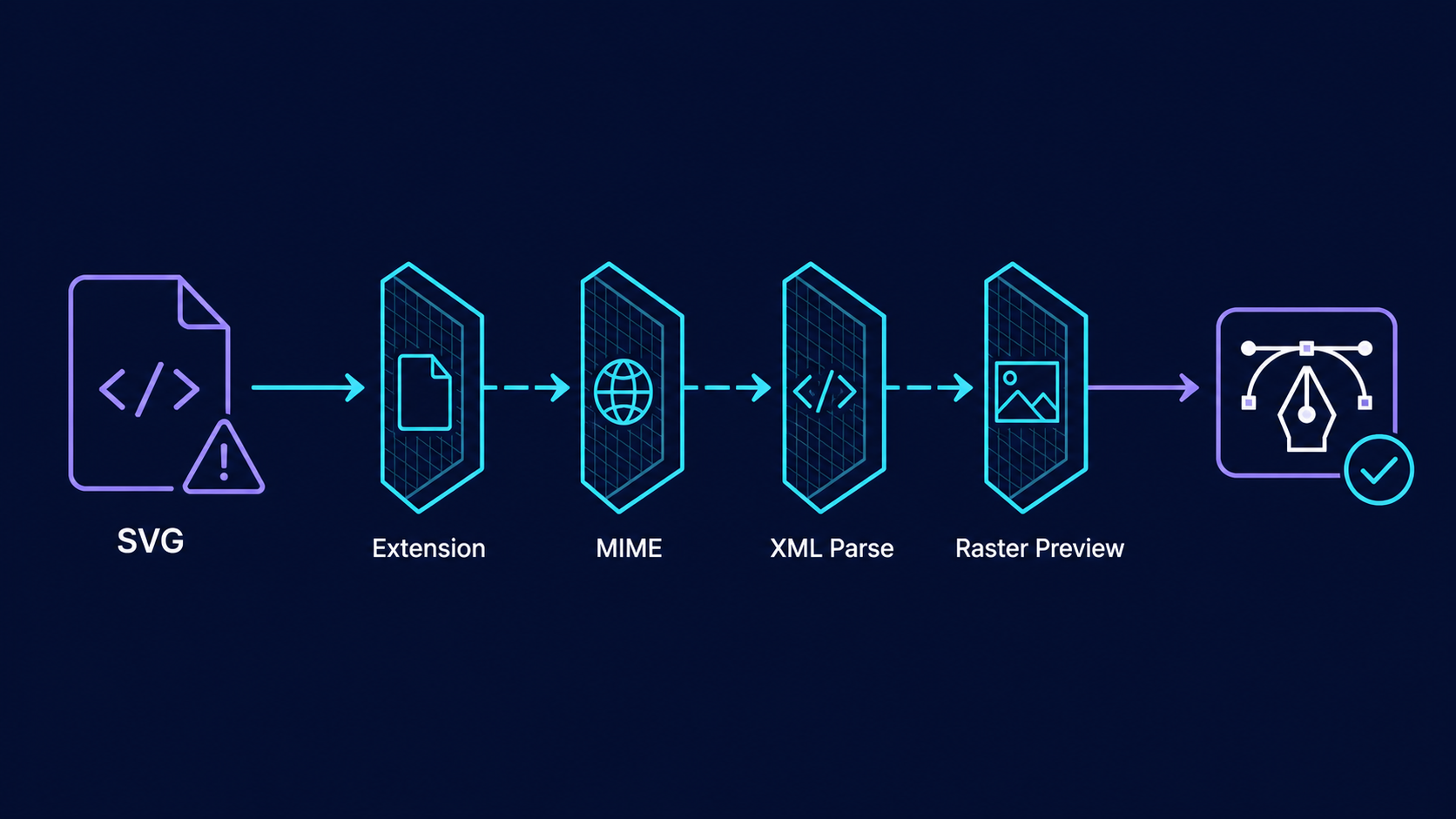
What is an SVG polyglot file?
An SVG polyglot file is a byte sequence designed to be accepted as more than one format or interpreted differently by separate parsers. One component may see harmless XML or an image, while a browser, archive tool, metadata extractor, or later transformation step sees active or unexpected content.
Ambiguity can come from appended data, misleading headers, parser recovery, encoding tricks, namespaces, processing instructions, or a mismatch between what the upload gateway checks and what production later renders.
filename: company-logo.svg
request Content-Type: image/svg+xml
These claims are not independent proof. Both arrive from the client; the server must establish what the content actually is.
Why do extension and MIME checks fail?
Extension and MIME checks fail because they describe a file rather than safely interpreting it. Attackers can rename a file and set an arbitrary request header, while servers, proxies, browsers, and libraries may sniff or recover malformed content differently.
The OWASP File Upload Cheat Sheet recommends layered controls including allowlisted extensions, type and signature checks, safe filenames, storage controls, size limits, and content validation. It warns that the request Content-Type is user-controlled and cannot be trusted by itself.
SVG makes simplistic signature checks especially weak because it is text-based XML. Unlike PNG, there is no single fixed byte prefix that establishes a valid, safe SVG. A legitimate document may start with a UTF byte-order mark, whitespace, an XML declaration, or a comment before the <svg> root.
| Validation layer | What it proves | What it cannot prove |
|---|---|---|
.svg extension | Submitted name matches the allowlist | Bytes are SVG or safe |
image/svg+xml header | Client claims SVG content | Claim is true |
| File-type sniffing | Bytes resemble XML/SVG | Full document is safe |
| XML parse | Document is well-formed | Elements are allowed |
| Sanitization | Known unwanted features were removed | Every downstream parser agrees |
| Controlled render | Renderer made the expected image | Original is safe to serve inline |
How do I validate an SVG upload safely?
Validate an SVG upload as a pipeline, not a single test. Normalize the filename, cap the request size, decode text strictly, parse XML with dangerous features disabled, require an SVG root in the SVG namespace, sanitize with an allowlist, render in isolation, and store only the cleaned result or a raster derivative.
- Generate the storage name yourself. Keep the original name only as escaped metadata if needed.
- Enforce byte and dimension limits. Reject oversized documents before expensive work.
- Compare declared and expected types. Treat a mismatch as rejection evidence.
- Decode deterministically. Reject unsupported encodings and unexplained trailing payloads.
- Parse strictly. Disable DTDs, external entities, XInclude, networking, and error recovery.
- Require the correct root. It should be
svginhttp://www.w3.org/2000/svg. - Apply an allowlist. Remove scripts, event handlers, dangerous URLs, embedded HTML, and unsupported active features.
- Serialize a new document. Do not publicly serve the original bytes merely because they passed.
- Render in an isolated worker. Set CPU, memory, time, pixel, and recursion limits.
- Compare the derivative. For public uploads, a PNG or WebP preview is the easiest safe default.
For entity handling, follow the SVG XXE security guide. For browser-active markup, use the SVG XSS sanitization guide.
What parser settings prevent content confusion?
A safe parser rejects ambiguity instead of recovering from it. Disable DTD loading, external entities, XInclude, network access, and permissive error recovery; set input and tree-size limits; and accept only the XML and SVG features your application needs.
parseXml(bytes, {
  network: false,
  dtd: false,
  externalEntities: false,
  xinclude: false,
  recoverMalformedXml: false,
  maxBytes: configuredLimit,
  maxDepth: configuredLimit
})
Option names differ by library, so verify the documentation and add adversarial fixtures to automated tests. After parsing, check the expanded namespace name rather than searching raw text for <svg. String matching can be fooled by comments, prefixes, encoding, or unrelated text.
When should a suspicious SVG be rejected?
Reject a suspicious SVG whenever independent validators disagree, the parser recovers an error, forbidden nodes appear, trailing content cannot be explained, rendering exceeds a resource limit, or the cleaned visual output differs materially from the submitted artwork.
- Extension is allowlisted.
- Declared MIME type is exactly expected.
- Decoding succeeds under an allowed encoding.
- No unexplained bytes remain before or after XML.
- Strict XML parsing succeeds without recovery.
- Root local name and namespace are correct.
- Sanitizer finds no unresolved dangerous references.
- Re-serialized output parses under the same policy.
- Isolated rendering finishes inside resource limits.
- Preview contains the expected artwork.
Do not “fix” disagreement by trusting whichever detector says SVG. Quarantine the sample, record which checks differed, and improve the test corpus. Rejecting one odd logo is cheaper than teaching production to accept ambiguous files.
Should I rasterize SVG uploads?
Rasterizing a sanitized SVG is the safest practical preview strategy for most user-upload systems. It removes browser-active SVG features from the delivered preview and produces a predictable PNG or WebP artifact, although the renderer still needs isolation and resource limits.
Rasterization suits profile images, marketplace listings, comments, and any page where editability is unnecessary. Keep the original outside the public web root only if the product genuinely needs later editing or download.
For trusted artwork, create a clean vector through Image to SVG, inspect its nodes in the SVG Editor, and export a fresh file. To inspect unknown files before upload, read how to open an SVG safely.
What tests should an SVG upload pipeline include?
An SVG upload test suite should include valid edge cases and deliberately conflicting files. The goal is to prove every processing layer reaches the same decision, not merely that one sanitizer removes one familiar script payload.
- valid SVG with an XML declaration, comment, or UTF-8 BOM
- wrong extension with SVG bytes and
.svgwith non-SVG bytes - mismatched request MIME type
- malformed XML that a permissive parser might recover
- DTD, external entity, and XInclude input
- event attributes, scripts,
<foreignObject>, and remote references - unexpected namespaces and prefixed roots
- appended binary or archive-like data
- deeply nested trees, huge paths, filters, and dimensions
- files that render differently before and after sanitization
Keep the corpus in CI and run it against the exact parser, sanitizer, and renderer versions used in production. Security is a property of the whole chain.
FAQ
What is an SVG polyglot file?
An SVG polyglot file is crafted to be interpreted as more than one file or content type by different parsers. It may pass a shallow upload check but behave differently in a browser, image library, XML parser, or downstream service.
Is checking the .svg extension enough?
No. A filename is user-controlled metadata. Validate the declared type, inspect the bytes, parse with a hardened XML parser, enforce an SVG allowlist, and generate a safe derivative before public use.
Can magic-byte detection identify every SVG?
No. SVG is XML text without one universal binary signature. It may begin with whitespace, a byte-order mark, an XML declaration, or comments, so detection must be paired with strict parsing and structural validation.
Should uploaded SVG files be served inline?
Untrusted originals should not be inserted directly into page HTML. Sanitize and isolate them, or serve a rasterized derivative. Inline SVG should come only from a trusted, controlled source.
What should happen when validators disagree?
Reject or quarantine the file. A mismatch between the extension, MIME type, parsed root, or decoder result is a security signal, not something the pipeline should guess around.
Create your own SVG graphics with AI
Describe what you need, get a production-ready vector in seconds. No design skills required.
About This Article
This article was written by SVG Genie Team based on hands-on testing with SVG Genie’s tools and years of experience in vector design and web graphics. All recommendations reflect real-world usage and are reviewed by the SVG Genie editorial team for accuracy.
About the Author
SVG Genie Team
SVG Design Expert & Technical Writer at SVG Genie
SVG Genie Team is a vector design specialist and technical writer at SVG Genie with years of hands-on experience in SVG tooling, AI-assisted design workflows, and web graphics optimization. Their work focuses on making professional vector design accessible to everyone.
More articles by SVG Genie Teamarrow_forward