Your Figma icon is the right shape, but it ships with fill="#111827". Now every hover state, dark-mode screen, and design-system color needs another edit.
The fast fix:
Replace only the icon's intended themeable fill or stroke with currentColor, inline the SVG or render it as a component, then control it with CSS color. Do not use an <img> tag when the SVG must inherit page color.
That turns one exported file into a reusable icon that follows buttons, links, alerts, and themes. If your export needs broader cleanup first, use the Figma SVG clean-code workflow. Inspect the result in SVG Editor and validate it with SVG Validator.
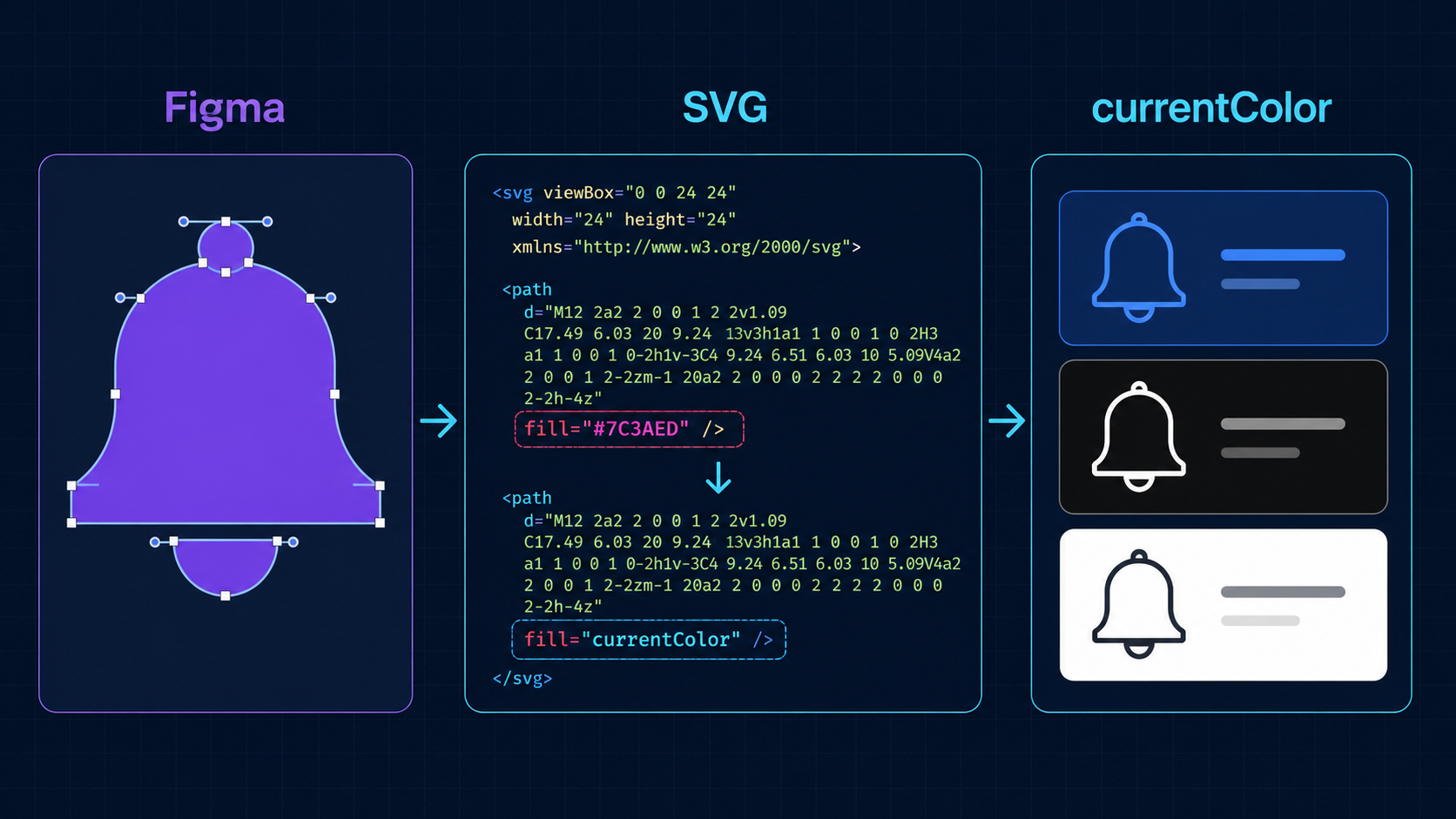
What does currentColor mean in SVG?
currentColor is a CSS keyword that resolves to the computed value of an element's color property. In SVG, it can paint fill, stroke, and other color-aware properties. The icon then receives color through CSS instead of storing a fixed hex value in every path.
SVG currentColor is a bridge between vector paint and CSS text color. It is part of CSS color behavior, not a special Figma export setting. MDN documents both currentColor and the SVG fill attribute.
Before:
<svg viewBox="0 0 24 24" aria-hidden="true">
  <path fill="#111827" d="M12 2 22 20H2Z" />
</svg>
After:
<svg viewBox="0 0 24 24" fill="currentColor" aria-hidden="true">
  <path d="M12 2 22 20H2Z" />
</svg>
.warning-icon { color: #d97706; }
The geometry stays identical. Only the source of its color changes.
How do I convert a Figma SVG to currentColor?
Export the smallest correct vector, open the SVG as text, identify the paint values that should follow the interface theme, and replace those values with currentColor. Put the shared value on the root SVG when every relevant child uses one color; otherwise change only specific paths or strokes.
Use this workflow:
- Export the icon as SVG from Figma.
- Open it in a code editor or SVG Editor.
- Search for
fill=,stroke=, inlinestyle, and hex or RGB values. - Decide which colors are structural and which should follow the UI.
- Replace the themeable paint with
currentColor. - Inline the SVG, render it as a component, and test real CSS states.
| Exported artwork | Best change | Why |
|---|---|---|
| One-color solid icon | fill="currentColor" on <svg> | Shortest reusable markup |
| One-color outline icon | stroke="currentColor" on <svg> | Keeps all lines in sync |
| Mixed solid and outline icon | Change selected paths only | Avoids recoloring every layer |
| Brand logo | Usually keep fixed fills | Brand colors should not inherit accidentally |
| Two meaningful colors | Keep fixed colors or use CSS variables | One inherited color loses meaning |
Figma may repeat the same paint on every path. Moving it to the root reduces duplication, but only when all children should share the color. If the markup contains broken gradients or repeated definition IDs, first use the Figma SVG gradient guide or duplicate-ID collision guide.
Should I use fill=currentColor or stroke=currentColor?
Use fill="currentColor" when the visible icon is made from filled shapes. Use stroke="currentColor" when it is drawn with outlines. A Figma export can contain both, so inspect the artwork instead of changing every attribute globally.
<!-- Solid icon -->
<svg viewBox="0 0 24 24" fill="currentColor" aria-hidden="true">
  <path d="M4 4h16v16H4z" />
</svg>
<!-- Outline icon -->
<svg viewBox="0 0 24 24" fill="none" stroke="currentColor"
     stroke-width="1.5" aria-hidden="true">
  <path d="M4 12h16M12 4v16" />
</svg>
Do not replace fill="none" with currentColor; that can turn an open outline into a solid block. Preserve none, masks, clipping paths, gradients, opacity, and deliberately fixed colors. For lines that change weight after export, follow the Figma SVG stroke fix.
Why does currentColor not work with an SVG img tag?
An SVG displayed through <img src="icon.svg"> is loaded as an external image. Its shapes do not normally inherit color from the surrounding HTML document, so setting color: red on the <img> or its parent will not recolor paths inside that file.
| Method | Inherits page color? | Best for |
|---|---|---|
Inline <svg> | Yes | Themeable icons and controls |
| React/Vue/Svelte component | Yes | Component libraries |
<img src="icon.svg"> | No | Fixed-color artwork |
CSS background-image | No | Fixed decorative assets |
| CSS mask | Yes, through background-color | Simple monochrome icons |
If you need <img> for caching or a strict asset pipeline, keep color inside the file or generate variants. If the external SVG fails to display, use the SVG not showing in browser checklist.
How do I use a currentColor SVG in React?
Convert the SVG into JSX, keep its viewBox, set the relevant paint to currentColor, and accept a className or style prop. Then use normal CSS color or utility-framework text-color classes at the component call site.
type IconProps = React.SVGProps<SVGSVGElement>;

export function SparkIcon({ className, ...props }: IconProps) {
  return (
    <svg viewBox="0 0 24 24" fill="currentColor"
      className={className} aria-hidden="true" {...props}>
      <path d="M12 2 14.8 9.2 22 12l-7.2 2.8L12 22l-2.8-7.2L2 12l7.2-2.8Z" />
    </svg>
  );
}
<SparkIcon className="h-5 w-5 text-violet-600 hover:text-violet-800" />
In JSX, rename attributes such as stroke-width to strokeWidth, fill-rule to fillRule, and clip-path to clipPath. Keep accessible text for meaningful standalone graphics; use aria-hidden="true" when a nearby label already communicates the purpose.
For the full handoff—including prop forwarding, responsive sizing, unique IDs, and accessible names—use the Figma SVG to React component workflow.
How do I make the icon work in dark mode and hover states?
Once the SVG uses currentColor, define color states on it or an ancestor. The icon can inherit a button's text color automatically, preventing the label and icon from drifting apart across hover, disabled, selected, and dark-mode states.
.action { color: #334155; }
.action:hover { color: #6d28d9; }

@media (prefers-color-scheme: dark) {
  .action { color: #e2e8f0; }
}
Before shipping, check:
- Default, hover, focus, active, and disabled states
- Light and dark backgrounds
- Filled and outlined layers at 16px and 24px
- Meaningful multicolor details remain fixed
- The SVG still has a correct
viewBox - The final file passes SVG Validator
For several independently themed colors, CSS custom properties are clearer than forcing everything through one value:
<path fill="var(--icon-primary, currentColor)" d="..." />
<path fill="var(--icon-accent, #8b5cf6)" d="..." />
When should I not use currentColor?
Do not use currentColor as a blanket cleanup rule for illustrations, brand marks, data visualizations, or artwork whose colors communicate meaning. It is strongest for monochrome interface icons and selected layers that should match surrounding text or controls.
Keep fixed paint when the exact brand palette matters, multiple colors distinguish states, a gradient is part of the artwork, or the asset must look identical everywhere. Use currentColor when an icon sits beside text, one component needs several theme variants, dark mode currently requires duplicate files, or a design-system icon should accept color from its consumer.
If the export is bloated after the color change, run SVG Optimizer conservatively. If you need to rebuild the vector instead of repairing an export, generate an SVG with SVG Genie and apply the same theme-ready handoff.
FAQ
How do I make a Figma SVG use currentColor?
Open the exported SVG, replace the intended solid fill or stroke with currentColor, and embed the SVG inline or as a component. Set color on the SVG or its parent with CSS. Preserve colors that must remain fixed.
Why does currentColor not work in an SVG img tag?
An SVG loaded through an img element is an external image document, so it normally cannot inherit the surrounding page's CSS color. Inline the SVG, use it as a component, or use a CSS mask.
Should I use fill currentColor or stroke currentColor?
Use fill="currentColor" for solid icons and stroke="currentColor" for outline icons. Changing every fill and stroke blindly can destroy intentional details, masks, or multicolor artwork.
Can currentColor make a Figma SVG work in dark mode?
Yes. Once the relevant SVG paint uses currentColor, the icon follows the CSS color selected by your light or dark theme. Test both backgrounds and preserve fixed colors that carry meaning.
Does currentColor work in React SVG components?
Yes. Set fill or stroke to currentColor in JSX, pass a className or style prop, and control the component with CSS color. Convert hyphenated SVG attributes to React-compatible camelCase when needed.
Create your own SVG graphics with AI
Describe what you need, get a production-ready vector in seconds. No design skills required.
About This Article
This article was written by SVG Genie Team based on hands-on testing with SVG Genie’s tools and years of experience in vector design and web graphics. All recommendations reflect real-world usage and are reviewed by the SVG Genie editorial team for accuracy.
About the Author
SVG Genie Team
SVG Design Expert & Technical Writer at SVG Genie
SVG Genie Team is a vector design specialist and technical writer at SVG Genie with years of hands-on experience in SVG tooling, AI-assisted design workflows, and web graphics optimization. Their work focuses on making professional vector design accessible to everyone.
More articles by SVG Genie Teamarrow_forward